
An AI shopping assistant should help a customer make the next buying decision—not add another decorative chat surface. For most ecommerce teams, that means getting product information and visuals right first. A live AI avatar is useful only when a conversation can genuinely reduce uncertainty, guide a complex choice, or make a product easier to evaluate.
An AI shopping assistant has more than one job
People use the phrase “AI shopping assistant” for many different experiences: a search helper, a product-comparison tool, a concierge, or a conversational guide. They are not the same product. Before choosing a presentation layer, define the next decision the assistant needs to make easier.
If a shopper needs a SKU, size, or price, a fast interface and trustworthy product information are usually the right answer. If they need help articulating an occasion, comparing unfamiliar options, or working through a multi-step choice, an interactive assistant can add value. That distinction matters more than whether the experience happens to include an avatar.
Start with product visuals, not with the avatar
Images and short generated video answer a different question from a conversational assistant: “What does this product look like, and how could it fit into my life?” They should be treated as product evidence, not decoration.
For a fashion, beauty, home, or consumer-electronics catalog, a useful visual set may include a clean product image, a contextual scene, a detail view, and a short demonstration. The assistant can then point to those assets while it explains the differences that matter to a buyer. It should not invent a visual claim that the catalog cannot support.
Before an engineering team prototypes interaction, creative and commerce teams need a shared reference for the product look, approved scenes, and the variants that are safe to show. A visual workspace such as Igly Canvas can help teams organize references, edit layers, compare versions, and hand off approved material. This is a workflow example, not an Igly–Spatius integration or joint product offering.
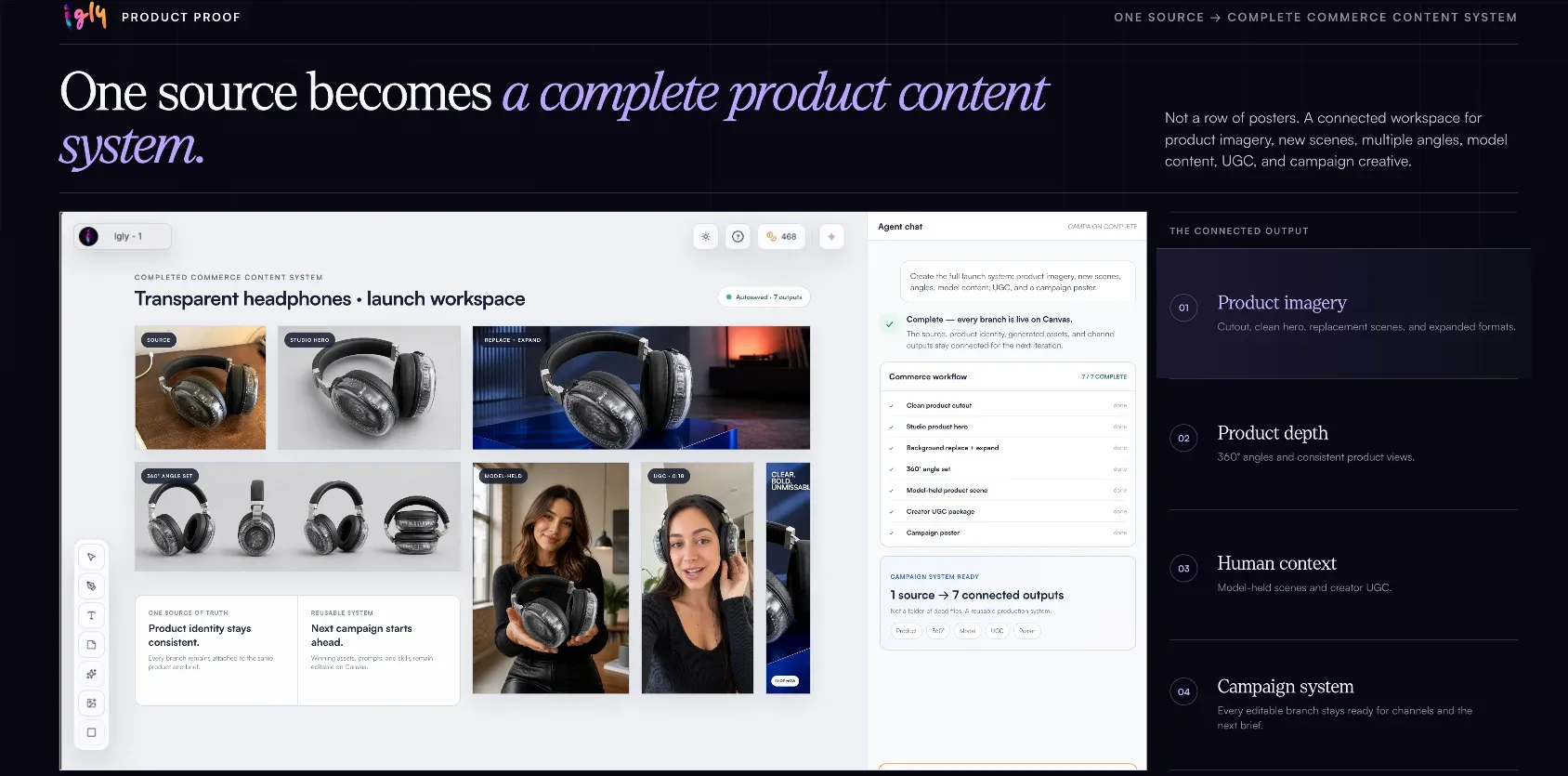
Igly Canvas product-content workspace. Shown as a visual-workflow example; it does not depict a Spatius integration or joint offering.
Decide whether the customer needs a conversation or a finished asset
Generated video is often the better format when the message is fixed. A launch clip, a product-detail demonstration, or a campaign variation can be reviewed and published as a finished asset. The viewer watches; the brand controls the sequence.
A real-time avatar is a different layer. It belongs in an experience where the shopper can ask follow-up questions, change direction, or need a response that fits a live conversation. An API that produces a finished video and an API that drives a real-time avatar therefore solve different product requirements, as explained in Spatius’s guide to AI avatar APIs versus AI video-generation APIs.
For the real-time case, Spatius documents an architecture in which speech audio becomes motion data and the client renders the avatar locally. The product team still owns the assistant logic, catalog access, policy rules, and the answer itself; the avatar is the presentation layer for approved speech and interaction. Review the Spatius getting-started documentation before making implementation assumptions.
Use the smallest experience that answers the buying question
The right shopping assistant is not automatically the most visual one. Use a text or conventional UI-first experience when the task is quick, repeatable, or primarily transactional. Use product images and generated video when visual proof is the core need. Consider a live avatar when the customer benefits from a guided, spoken, back-and-forth explanation.
This distinction also protects the customer experience. A speaking avatar should not block a shopper from scanning specs, checking price, changing quantity, or leaving the conversation. The interaction should remain optional, have a clear job, and preserve accessible text alternatives. The same design principles apply when deciding where an AI avatar should live in a SaaS product: give it a defined task rather than making it compete with the entire interface.
Check the runtime cost only after the use case is clear
Once a team has established that a live, conversational layer has a real job to do, it can estimate runtime cost against expected session volume. That is the right point to evaluate pricing: after validating the shopper task, but before building a production experience.
| Spatius plan | Monthly price | Included usage | Published usage rate |
|---|---|---|---|
| Free | $0 | 1,000 credits (about 100 minutes) per month | — |
| Starter | $19 | 20,000 credits (about 2,000 minutes) per month | $0.009 per minute |
| Builder | $49 | 55,000 credits (about 5,500 minutes) per month | $0.009 per minute |
| Growth | $149 | 180,000 credits (about 18,000 minutes) per month | $0.009 per minute |
| Scale | $299 | 400,000 credits (about 40,000 minutes) per month | $0.007 per minute |
These are the published monthly plan figures as of September 22, 2026; plans, credits, and terms can change. Confirm the current details on the Spatius pricing page before making a procurement decision. The table covers the avatar layer only—it does not include an LLM, text-to-speech provider, catalog system, implementation work, or the production of product visuals.
A practical evaluation checklist
Before adding a live layer to an AI-powered shopping assistant, test the whole journey rather than a polished demo.
- Catalog grounding: Can the assistant distinguish approved product facts from general advice?
- Visual accuracy: Does every image or video match the selected product, variant, and availability context?
- Conversation recovery: Can a shopper interrupt, correct an assumption, or return to the product page without friction?
- Accessibility and fallback: Is the same essential information available through text and ordinary controls?
- Device performance: Does the experience remain responsive on the browsers and devices your customers actually use?
For teams evaluating the avatar layer itself, Spatius’s article on designing the first interaction with an AI avatar is the appropriate follow-up: it covers defining the avatar’s job, controls, and a clear exit path. That is deliberately a separate decision from choosing product imagery or campaign assets.
Frequently asked questions
What makes the best AI shopping assistant?
The best fit depends on the customer decision. It should have reliable product information, a low-friction interface, and only the presentation layer needed to help a shopper decide.
Should every AI shopping assistant use a live avatar?
No. A live avatar is most useful for guided, conversational decisions. Simple product lookup, filtering, pricing, and checkout tasks often work better with conventional interface patterns.
Can product images and a live avatar appear in the same experience?
Yes, if each has a clear role: product visuals provide evidence, while the conversation helps a shopper interpret options. The experience should not imply that the avatar itself verifies product facts.
Does this workflow require an Igly and Spatius integration?
No. Igly Canvas is cited here as an example of a visual-reference workflow. This article does not describe an integration, partnership, automated handoff, or joint offering.
If you are building a customer-facing experience where a real-time avatar has a defined conversational job, request a Spatius demo to evaluate the interaction layer against your product, device, and content requirements.
Last verified: September 22, 2026.