
Quick verdict
Choose Tavus when you want a configurable Conversational Video Interface that can own perception, turn-taking, speech, intelligence, rendering, and the live room. Choose HeyGen LiveAvatar when you want a dedicated real-time avatar product with a clear choice between a managed FULL mode and a LITE mode for an existing AI stack.
For a team that already runs a LiveKit voice agent, neither product wins from a feature list alone. LiveKit currently documents avatar plugins for both providers, so the useful question is which integration preserves the control, session behavior, and operating model your application needs.
Tavus vs HeyGen LiveAvatar at a glance
| Decision area | Tavus CVI | HeyGen LiveAvatar |
|---|---|---|
| Core real-time product | Persona + Replica + Conversation | LiveAvatar session |
| Default product boundary | Configurable end-to-end CVI pipeline | FULL managed pipeline or LITE avatar path |
| Bring your own AI stack | Individual CVI layers can be configured | LITE mode is designed for this boundary |
| LiveKit support | Official LiveKit plugin for Python and Node.js | Official LiveKit plugin for Python |
| Separate asynchronous product | Tavus Video Generation | HeyGen Studio and Video API |
| First buying question | Which CVI layers should Tavus own? | Do you need FULL or LITE mode? |
Compare the real-time products, not the parent brands
“Tavus vs HeyGen” can describe two different decisions. Tavus maintains a real-time Conversational Video Interface and a separate asynchronous Video Generation product. HeyGen likewise separates its prerecorded video platform from LiveAvatar, the product built for live, two-way avatar sessions.
This comparison is therefore Tavus CVI versus HeyGen LiveAvatar. It does not compare template libraries, video editing, translation, or downloadable marketing videos. Those belong to a different workflow and a different search intent.
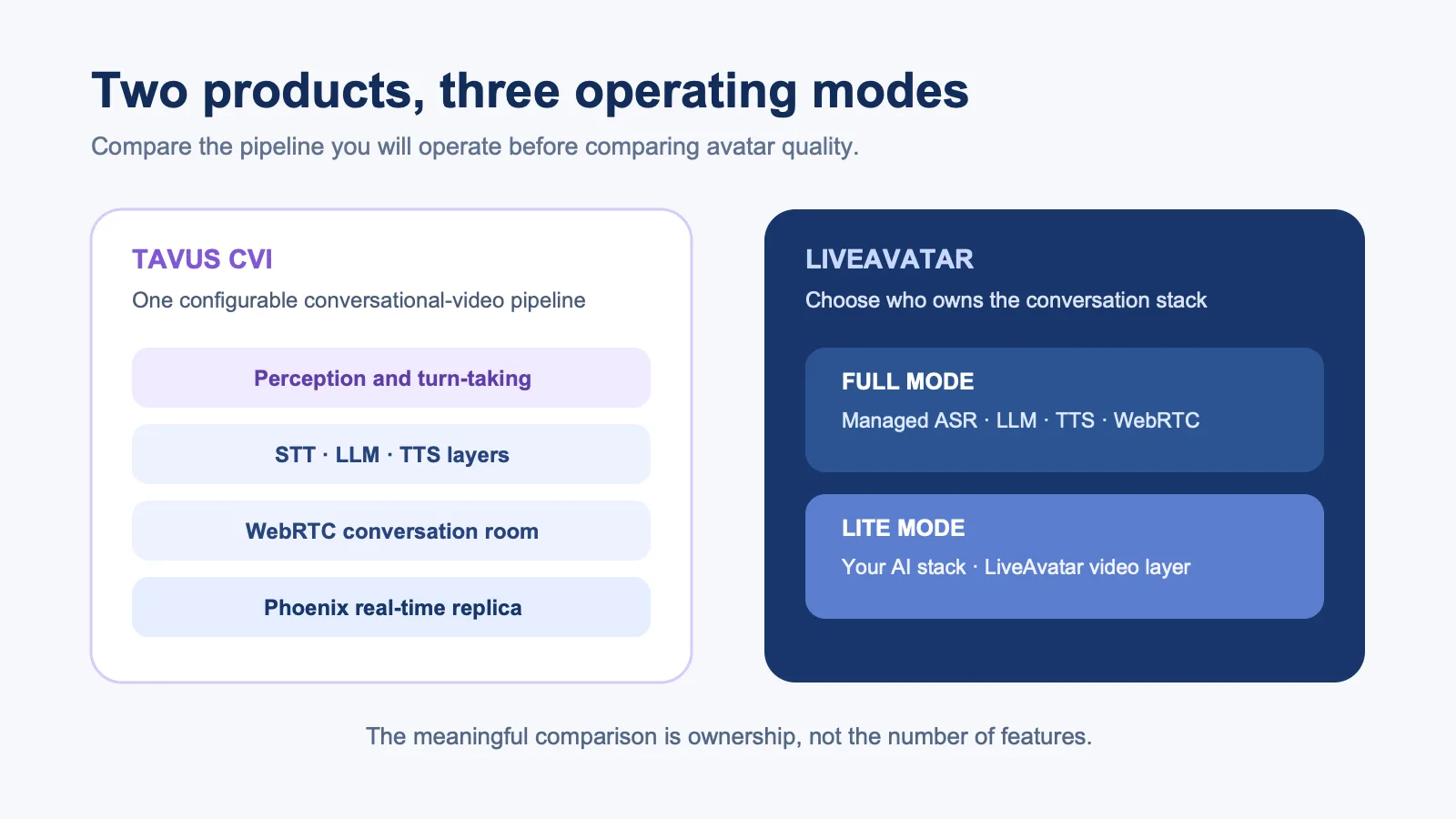
Tavus organizes CVI around a Persona, a visual Replica, and a Conversation. Its documented pipeline can include perception, conversational flow, STT, an LLM, TTS, and Phoenix real-time rendering. The layers are configurable, but the product starts from a broad conversational-video boundary.
LiveAvatar’s documentation makes the ownership choice explicit. FULL mode manages ASR, LLM, TTS, and WebRTC. LITE mode lets the customer supply the conversational stack while LiveAvatar handles the real-time avatar stream. That split can make procurement simpler when the team already knows whether it wants a managed agent or an avatar attached to an existing one.
Integration and LiveKit support
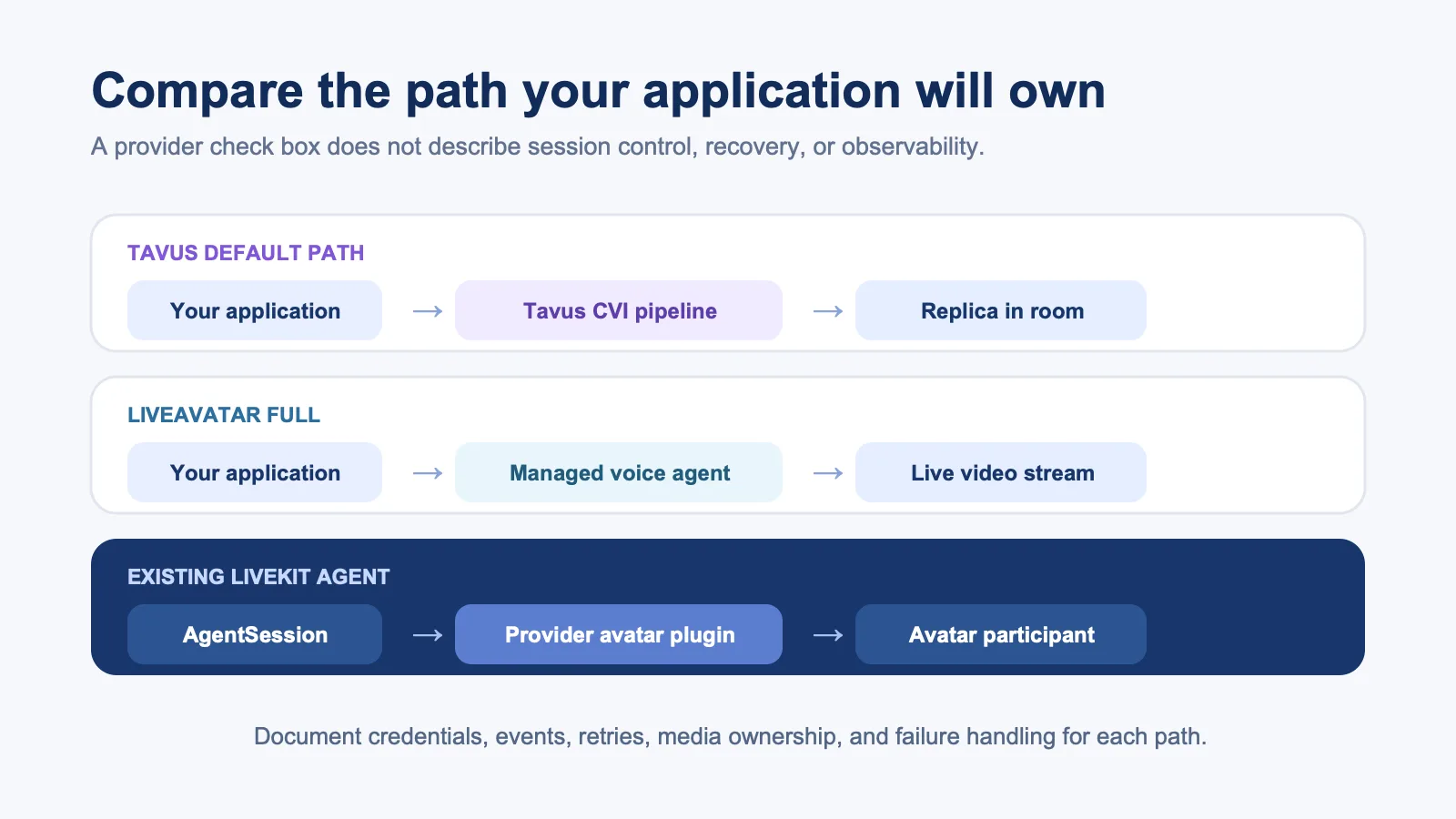
Both platforms can participate in a LiveKit agent architecture, but the current SDK surface is not identical. LiveKit’s avatar provider overview lists Tavus support for Python and Node.js and LiveAvatar support for Python. The LiveAvatar plugin guide shows the avatar joining the room as a separate participant and receiving the agent session’s audio output.
That common pattern does not make the products interchangeable. Document who creates the session, where credentials live, which service publishes audio and video, how an interruption cancels speech, which events reach your observability stack, and what happens after a network drop. If Node.js support is required, verify the exact provider plugin and version before committing to the client architecture.
Tavus also provides a React CVI component library for teams building its conversation UI directly. LiveAvatar offers an iframe path, a Web SDK, and custom WebRTC handling through LiveKit or Agora. The shortest demo is not necessarily the lowest-risk production path.
Pricing requires equivalent scope
Do not compare a Tavus conversation minute with a LiveAvatar LITE minute as though they include the same services. Tavus’s current developer plans combine included conversational-video usage, plan-level concurrency, and pay-as-you-go terms. Confirm those mechanics on the vendor’s official pricing page.
LiveAvatar charges credits at different rates for FULL and LITE modes, and its subscription tiers expose different session and commercial limits. Use the official credit documentation to calculate the current rate for the mode you plan to deploy.
For the pilot, calculate the complete workload: connected session time, concurrency, external STT/LLM/TTS spend, recordings, retries, idle time, and the engineering required to operate everything outside the vendor boundary.
Run one production-style pilot
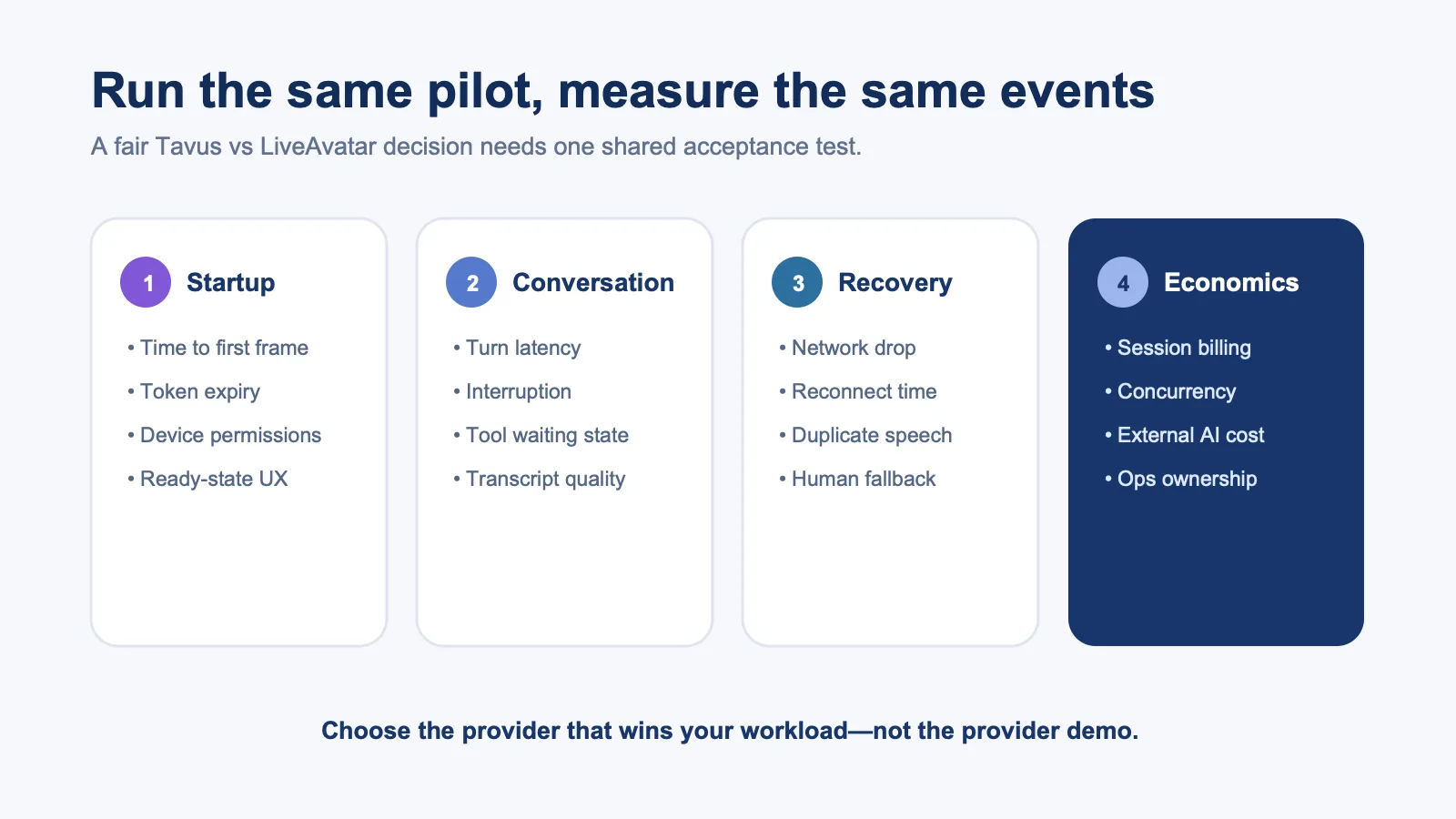
Use the same avatar brief, script, voice, agent behavior, devices, and network conditions for both products. Measure time to first usable frame, end-of-utterance to response, interruption behavior, tool-call waiting states, reconnection, duplicate audio, and full-session traffic. LiveKit’s plugin model is useful for keeping the surrounding agent constant while changing the avatar provider.
Also test the limits that polished demos avoid: expired tokens, a slow tool, a user speaking during the greeting, a 20-minute session, weak Wi-Fi, and a handoff to text or a human. Tavus documents interaction events; confirm the events you need and run equivalent checks against LiveAvatar’s current API.
Which platform should you choose?
Choose Tavus CVI when perception, persona configuration, turn-taking, and a broader vendor-managed conversation are valuable parts of the product. Choose HeyGen LiveAvatar when the FULL-versus-LITE split fits your ownership model, especially if your team wants a dedicated avatar product alongside the wider HeyGen ecosystem.
If your agent, tools, policies, and voice pipeline already work and you want the visual layer to remain independently replaceable, compare both with a narrower avatar-layer architecture. The LiveKit avatar API shortlist explains that wider decision, while LiveAvatar alternatives covers replacement intent rather than this head-to-head choice.
Last verified: September 11, 2026. Product modes, plugin support, pricing, limits, and vendor terminology can change.
Compare real-time avatar architectures with your production workload Request a demo, or ,或See the LiveKit integration.。