

Adding an AI avatar should extend the agent you already operate, not replace it. Your SaaS product can keep its conversation logic, knowledge, permissions, tools, and workflows while using a visual presenter in the moments where spoken guidance is useful.
For Spatius, the boundary is deliberate: your application produces the avatar’s speech audio; Motion Server converts that speech audio into motion data; and AvatarKit renders the avatar locally in the client. Spatius does not return a finished video or take over your application’s ASR, LLM, TTS, context, retrieval, permissions, tool calls, workflows, analytics, turn-taking, or handoff. The Spatius Developer Docs Map is the reference for the current architecture.
Key takeaways
- Treat the avatar as a presentation layer around an agent your product already owns.
- Keep knowledge, permissions, tools, workflow decisions, and data controls in your application or agent backend.
- Choose an integration path based on the runtime you already operate.
- Start with one product moment, then decide whether expansion is justified by what your team learns.
Start with the right system boundary
Before choosing an SDK or transport, decide what the avatar is responsible for. An avatar can make an answer easier to follow, guide a user through a product task, or create a more human-facing moment in an existing interaction. It should not silently become the owner of the conversation, customer data, or product actions.
Your existing AI agent remains responsible for interpreting input, retrieving context, deciding which tools to call, enforcing permissions, and producing an allowed response. Your existing TTS layer—or another audio source—produces the speech that the avatar performs.
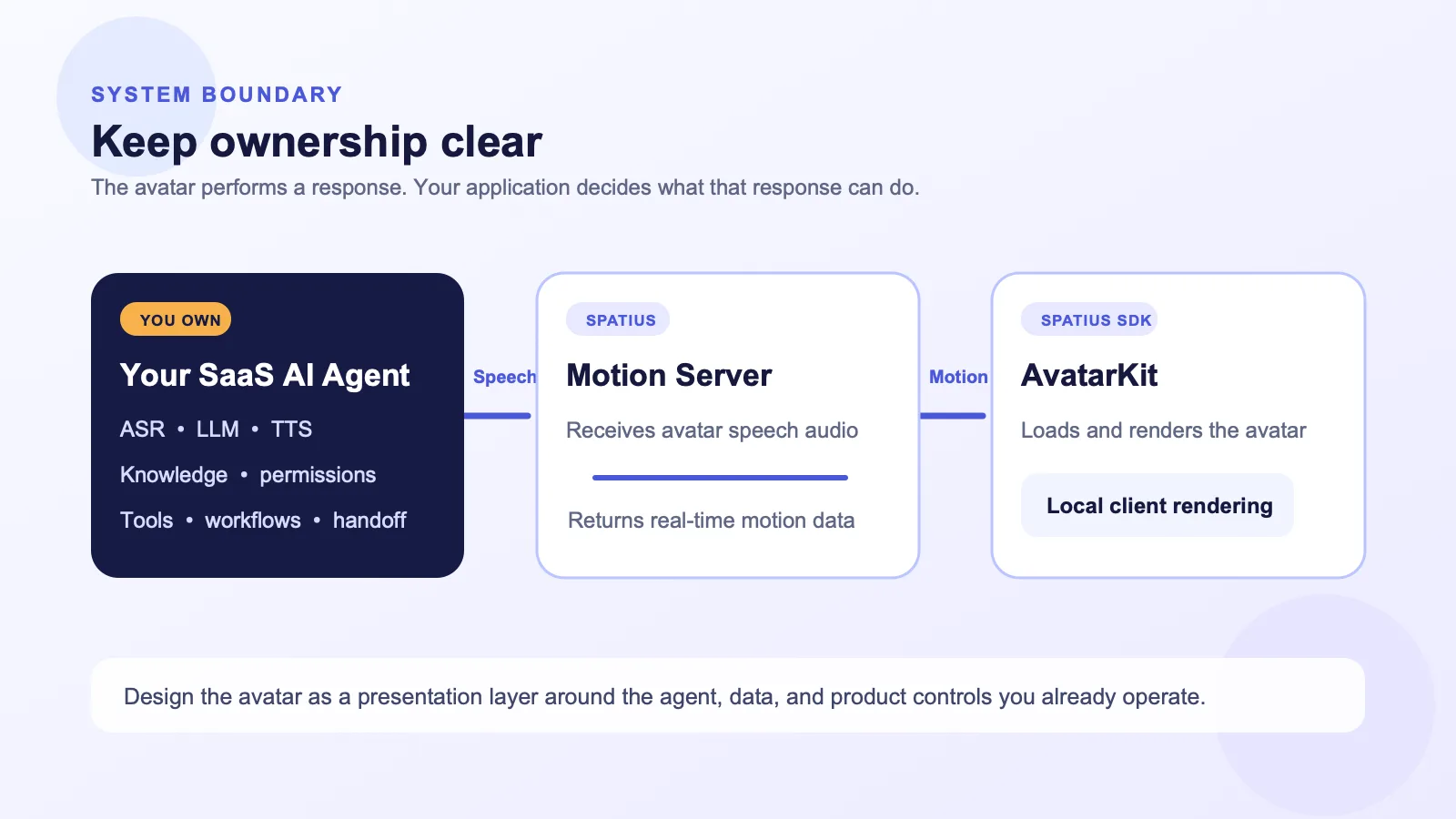
This separation makes the integration easier to reason about. It lets you use the avatar with the agent stack you have already chosen instead of rebuilding your product around another conversation system.
Choose the integration path that matches your architecture
Spatius supports different integration shapes. Choose one based on where speech audio is produced, where the runtime needs to be owned, and which paths are currently documented for your stack—not on a generic preference for a protocol.
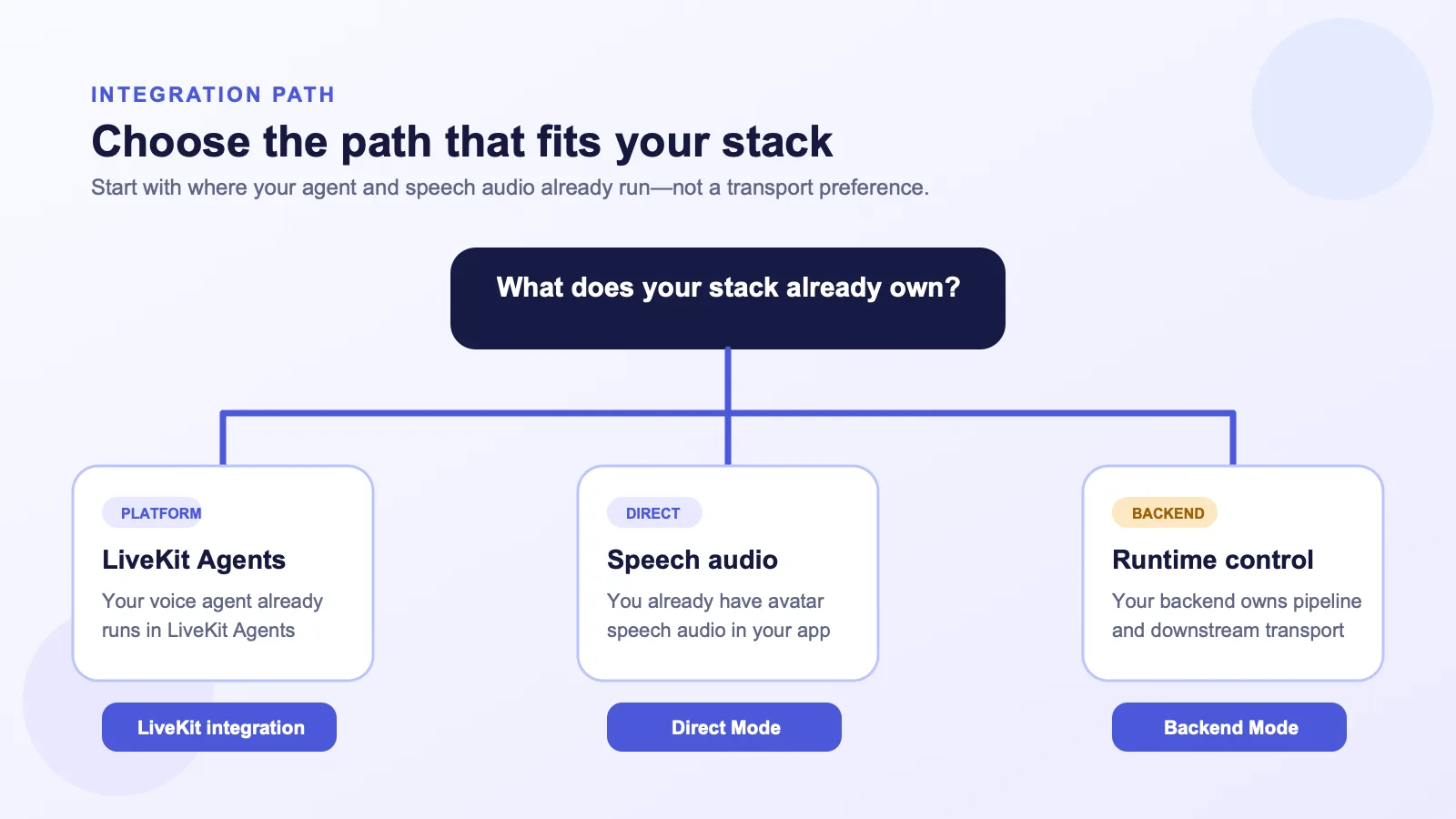
Direct Mode for an existing speech-audio flow
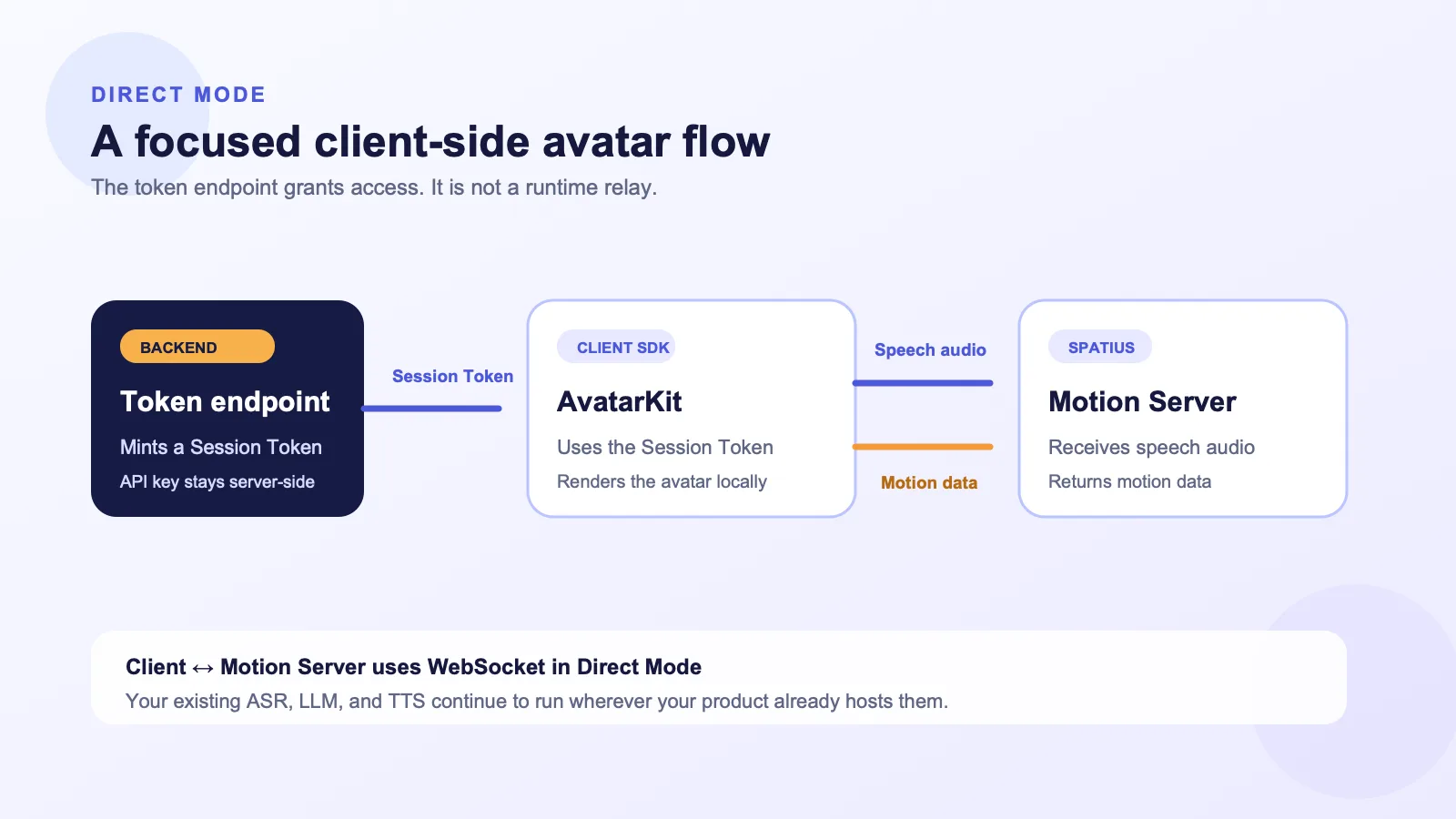
Use Direct Mode when your application already has avatar speech audio from TTS, an agent framework, prerecorded content, or another audio source and you want the client to handle avatar playback.
In this path, your backend signs a Session Token. AvatarKit in the client uses that token to connect to Motion Server over WebSocket, sends avatar speech audio, receives motion data, and renders the avatar locally. The token endpoint is not a replacement for your agent runtime: your application still owns ASR, LLM, TTS, context, retrieval, policy, and workflows.
Use another path only when your runtime needs it
If your existing voice-agent runtime has a current documented integration path, assess that path against the system you already operate. Use Backend Mode when your backend needs to own the audio pipeline and the downstream transport to the client. That choice gives your team more runtime responsibility, including the delivery, recovery, and observability behavior you decide to operate.
The key decision is ownership. Do not introduce a more involved runtime just because it appears more customizable in a diagram.
Add the avatar around one clear product moment
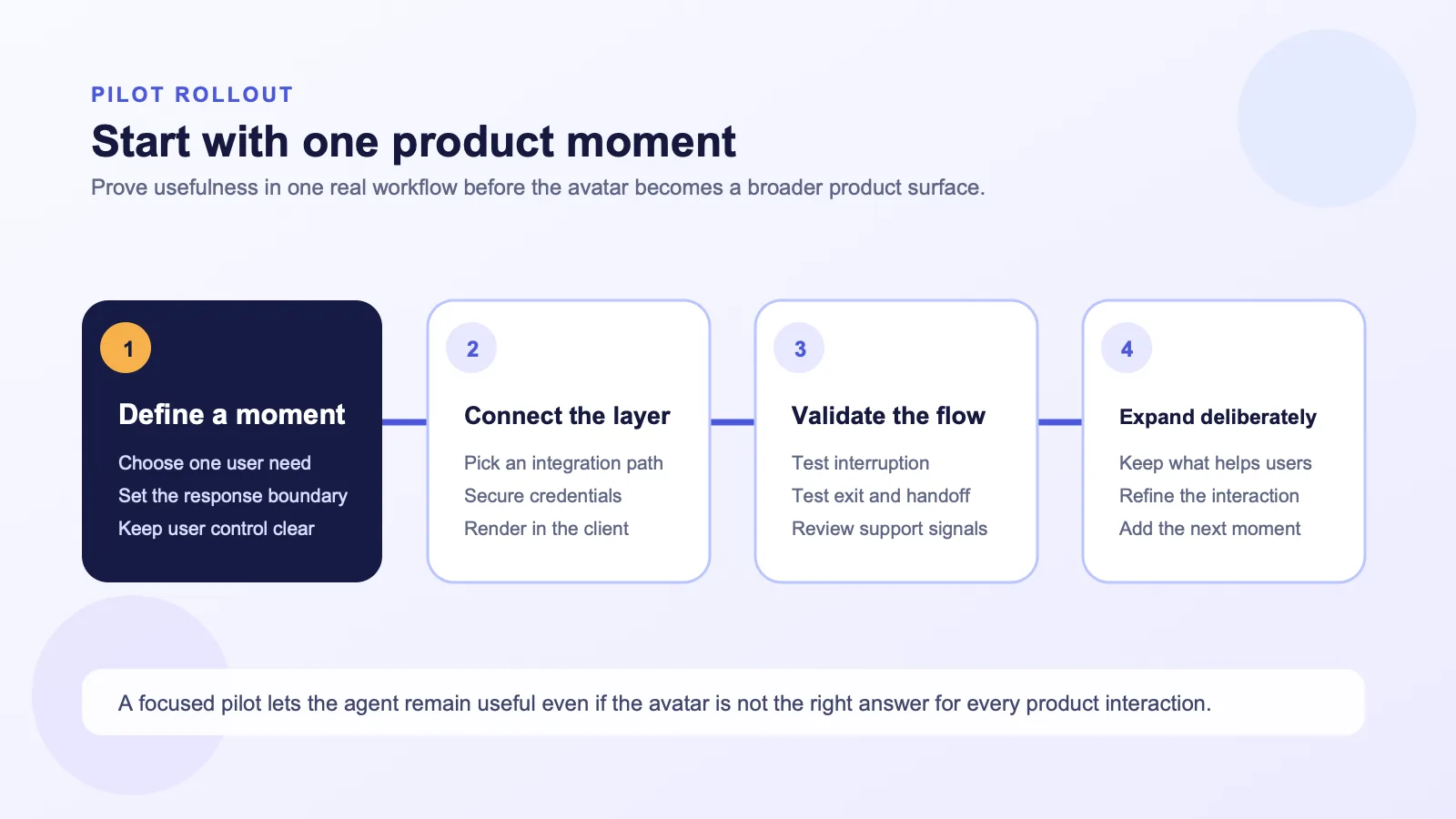
The first version should have a narrow job. Good candidates include a guided onboarding step, an explanation after a consequential action, a support flow where spoken guidance helps users follow a process, or a product demo already supported by your agent.
Avoid starting with “put an avatar everywhere.” Select one point where a visual presenter could make the existing answer clearer, then define what the agent may say, what information it may access, and which action stays under the user’s control.
Keep the conversation contract intact
Adding an avatar should not weaken your existing safeguards. The same product rules should continue to govern retrieval, permission checks, data handling, tool calls, escalation, and human handoff. The avatar presents the response; your application still determines which response is allowed and what it can do.
Write down:
- Which response types are suitable for the avatar.
- Which data sources and tools remain available to the agent.
- How a user can interrupt, leave, or request another interaction mode.
- When the product should hand off to a person or another workflow.
Test the integration as a product experience
The technical connection is only one part of the launch. Test the complete path: an input reaches your agent; your application evaluates context and permissions; TTS or another audio source produces permitted speech; Motion Server converts that avatar speech audio into motion data; and AvatarKit renders the motion locally.
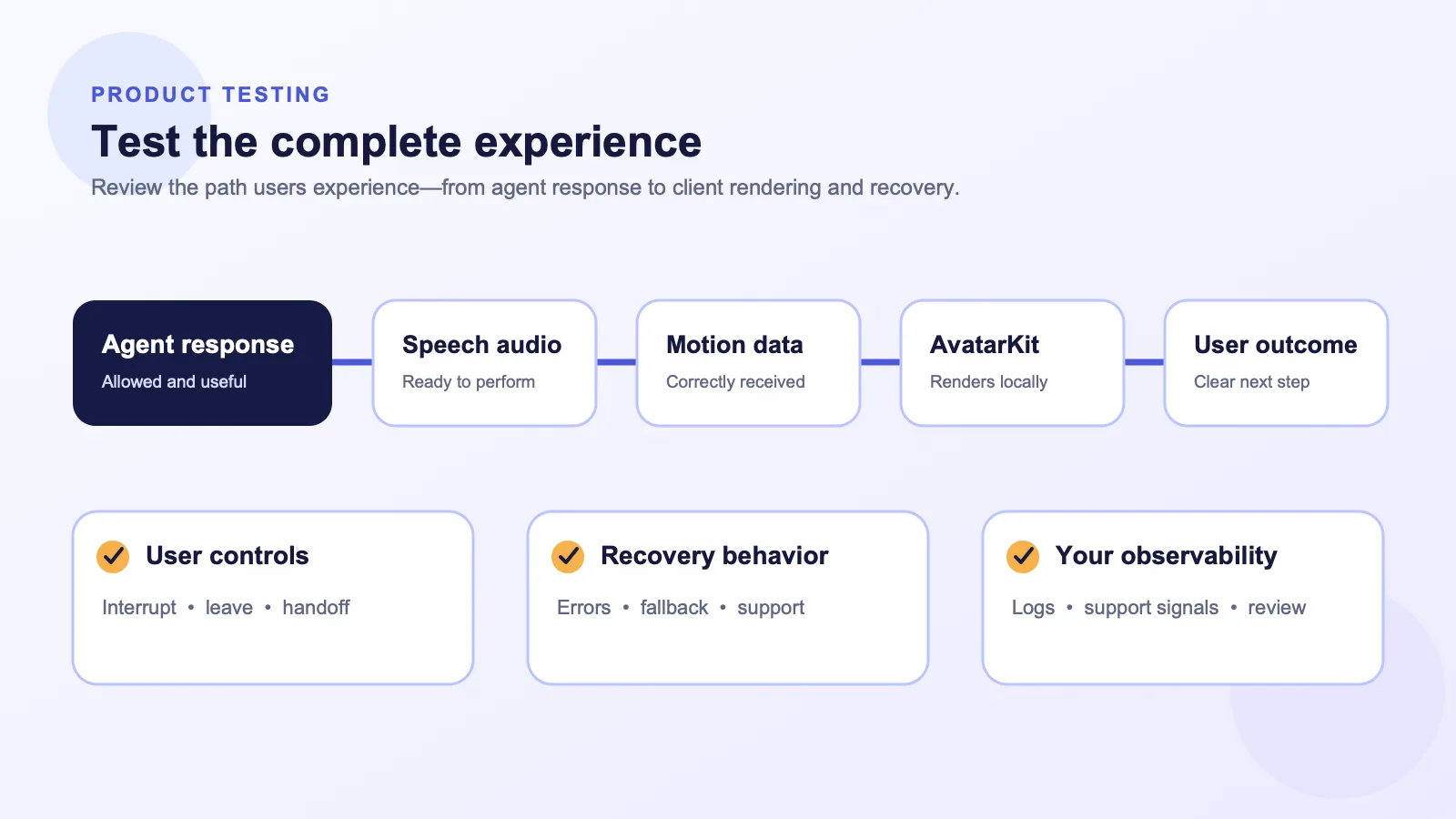
During a pilot, use questions tied to your product rather than borrowed benchmarks:
- Does the avatar make this response easier to understand or complete?
- Does it preserve the expectations users already have for the agent?
- Can a user interrupt, leave, or move to another workflow clearly?
- Do application logs and support signals give your team enough context to understand the experience?
Direct Mode includes an audio-only fallback if its WebSocket connection fails to connect within 15 seconds. Treat that specific behavior as one case to test in your flow, not as a substitute for product-level error handling and recovery design. See the Direct Mode guide for current requirements.
A practical implementation checklist
- Map ownership. Confirm that your app or agent backend owns ASR, LLM, TTS, knowledge, context, retrieval, permissions, tools, business logic, analytics, turn-taking, and handoff.
- Choose a path. Start with the integration-path guide and select the shape that matches your architecture.
- Keep credentials in the right place. Use a backend-signed Session Token for Direct Mode rather than exposing a server credential in the client.
- Build one real flow. Use a small but representative product moment, not a disconnected avatar demo.
- Validate controls and recovery. Test interruption, exit paths, error handling, and any human handoff your workflow requires.
- Expand deliberately. Add new moments only after your team understands the first one.
Frequently asked questions
Does adding Spatius replace my SaaS AI agent?
No. Your application or agent backend keeps ownership of ASR, LLM, TTS, context, retrieval, permissions, tool calls, workflows, analytics, turn-taking, and handoff. Spatius converts avatar speech audio into motion data, and AvatarKit renders the avatar locally.
Does Spatius send finished avatar video to the client?
No. Motion Server returns motion data, and AvatarKit renders the avatar locally on the client. The Developer Docs Map explains the product boundary.
Do I need a particular real-time transport to add an avatar?
No. Direct Mode uses a client WebSocket connection to Motion Server. Other paths should be selected only when they match the runtime and transport responsibilities your product already needs.
When should I use Backend Mode instead of Direct Mode?
Use Backend Mode when your backend needs to own the audio pipeline and downstream delivery. If you already have avatar speech audio and want a focused client-side integration, Direct Mode may be the more direct starting point. Confirm the details against the current integration documentation.
Bring a visual layer to the agent you already own
The strongest implementation is not the one with the most animation. It is the one where the avatar improves a specific product moment while your SaaS application remains in control of the intelligence, data, user controls, and workflows behind the experience.
If you are planning an integration and want to evaluate the right path for your stack, Request a Demo.