


An AI avatar can make a tool-driven SaaS workflow easier to follow—but it should not become the system that decides what to do, what a user is allowed to do, or whether an action succeeded.
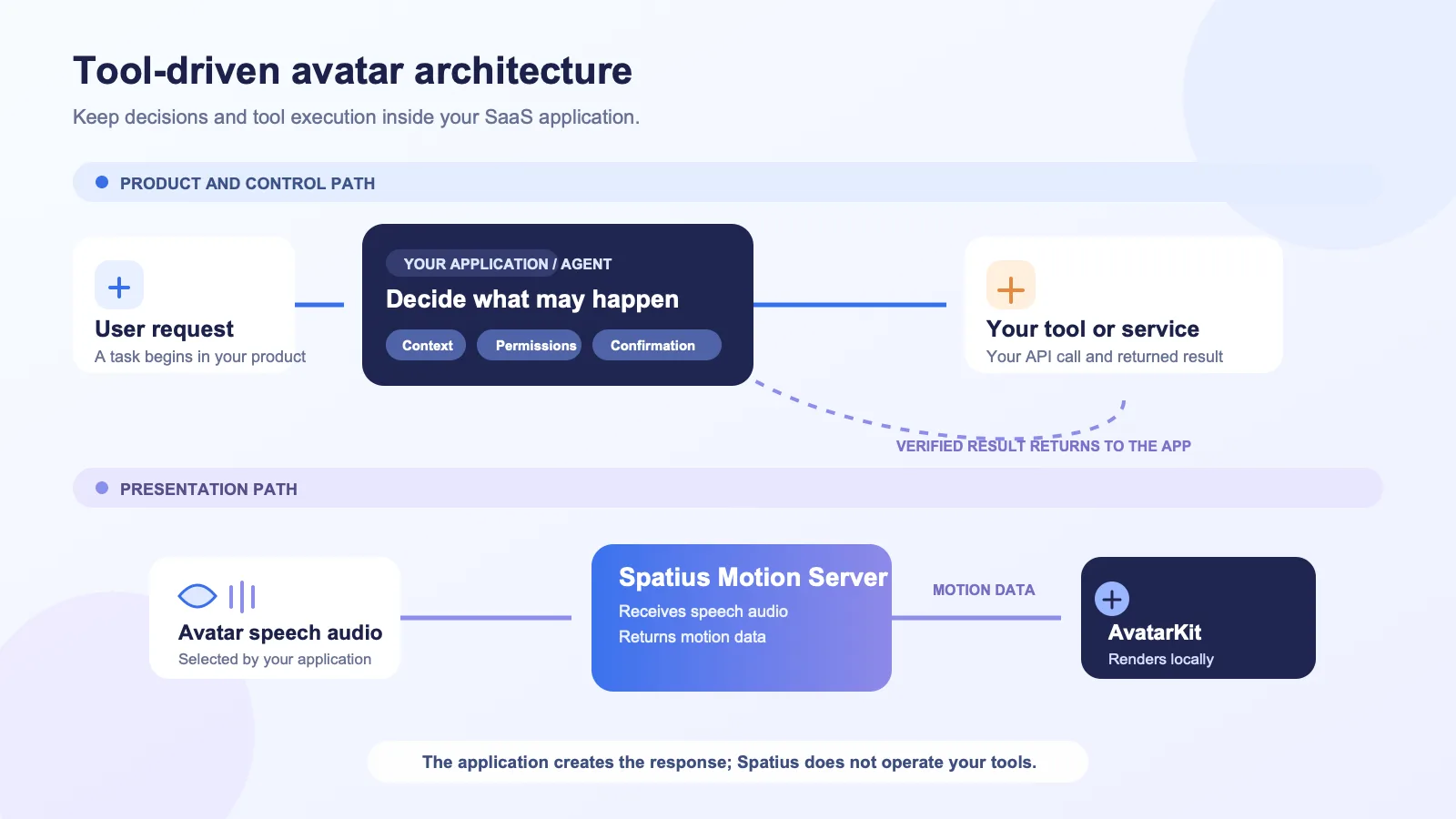
That distinction matters when an experience combines an AI agent with systems such as a CRM, billing service, internal knowledge base, or support platform. The application should remain the operational layer: it understands the user, applies permissions and confirmation rules, runs the tool, and records the result. The avatar is the presentation layer around that work.
For Spatius integrations, the product boundary is particularly clear: Spatius converts avatar speech audio into real-time motion data, and AvatarKit renders the avatar locally. It does not return finished video; conversation logic such as ASR, LLMs, TTS, turn-taking, and interruption policy belongs to the customer application, agent framework, or backend. Read the developer docs map.
Key takeaways
- Treat the avatar as a clear, real-time presentation layer—not as the authority that calls tools or approves actions.
- Keep identity, context, permissions, confirmation rules, tool execution, and audit records in your application and services.
- Let the user see the actual product state before, during, and after a tool call. The avatar can explain that state, but should not replace it.
- Match the avatar’s speech to known workflow states. Do not narrate a result before the application has received it.
- Start with one workflow where explanation or guidance is genuinely useful, then test the full interaction—including decline, interruption, failure, and handoff paths.
Start with the right ownership boundary
In a tool-driven workflow, several systems are involved. The easiest design mistake is to blur them into one conversational surface. Instead, define which layer owns each responsibility before deciding what the avatar says or where it appears.
| Responsibility | Recommended owner | What the avatar can do around it |
|---|---|---|
| User identity and access | Your product and identity system | Acknowledge the user-facing state without exposing sensitive details. |
| Product context and knowledge | Your application, agent, or backend | Explain information your application has chosen to surface. |
| Permissions and policy | Your application and services | Ask for confirmation when your product requires it; never imply an action is authorized until the app confirms it. |
| Tool selection and execution | Your application, agent framework, or backend | Tell the user what is about to happen, is happening, or has completed. |
| Tool result and audit trail | The system that owns the tool | Present a concise summary that matches the returned result. |
| Avatar speech and motion | Your TTS layer supplies speech; Spatius turns that speech audio into motion data | Render the avatar as it speaks. |
This is not just a technical drawing exercise. It gives the product team a simple rule for every line of avatar copy: is this an explanation of verified application state, or is it pretending to be the state itself?
The first is useful. The second creates ambiguity—especially when a tool can change customer data, trigger an external process, or require a particular role.
What the Spatius layer receives and returns
The exact integration path depends on your architecture, but the core motion path is narrow. In Direct Mode, AvatarKit on the client sends avatar speech audio to Motion Server, receives motion data, and renders the avatar locally. Your backend’s token endpoint is not an avatar runtime relay and does not run ASR, LLMs, or TTS. See the Direct Mode overview.
That leaves room for your product to keep its existing tool orchestration intact. The application can decide whether an agent should use a tool, how to enforce permissions, when to ask for confirmation, and which result should become spoken output. Once the application has selected speech audio, Spatius can drive the avatar’s motion from that audio.
Design the workflow first; add the avatar second
Do not begin with, “Where can we put a talking avatar?” Begin with a concrete user job and map the system state behind it.
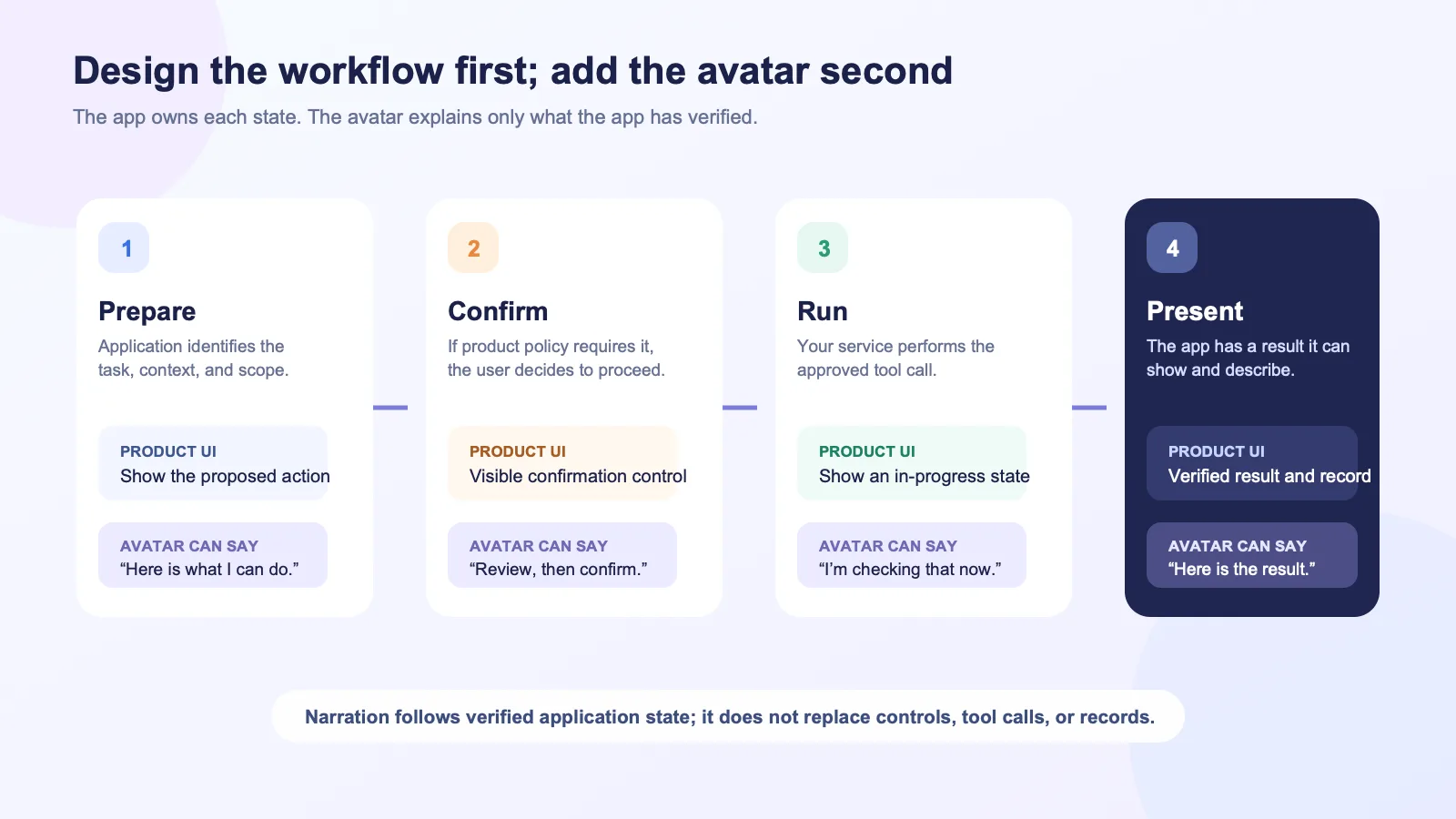
For example, consider a workspace administrator who asks an in-product agent to change a subscription setting:
- The user makes a request in the product.
- Your application identifies the user, relevant account, and permissions.
- The agent or orchestration layer determines whether a tool is appropriate.
- If the action needs confirmation under your product policy, the product asks for it in a visible control.
- Your service runs the approved tool call and receives a result.
- The product updates the relevant UI and audit trail.
- If you choose to present the outcome with an avatar, your TTS layer produces the approved spoken response; Spatius converts that speech audio into motion data for local avatar rendering.
The avatar adds explanation, pacing, and presence around this sequence. It does not replace the product’s controls, permission checks, API call, or result display.
Give each avatar moment a job
An avatar does not need to narrate every event. In a business product, its value should come from a specific interaction job—not from filling the interface with motion.
| Workflow moment | Useful avatar role | Keep in the product UI |
|---|---|---|
| Before a tool call | State the intended action in plain language. | The action summary, scope, and confirmation control. |
| While the app is working | Set expectations with a short status message only when it adds clarity. | A visible in-progress state and a way to wait, cancel, or continue elsewhere where your product supports it. |
| After a verified result | Summarize what the application reports and identify the next useful step. | The source-of-truth result, changed record, and relevant link or control. |
| When the result needs interpretation | Explain the option or trade-off using approved product language. | The underlying data, filter, calculation, or policy context. |
| When the workflow cannot continue | Say what is known and point to the available recovery path. | Error details, retry path, support route, or handoff control. |
A compact rule helps here: the screen should remain understandable with sound off, and the avatar should remain truthful if the user does not watch it.
This approach is also friendlier to people who prefer text, have audio muted, want to move quickly, or return to an in-progress task later.
Make confirmation a product decision, not an avatar performance
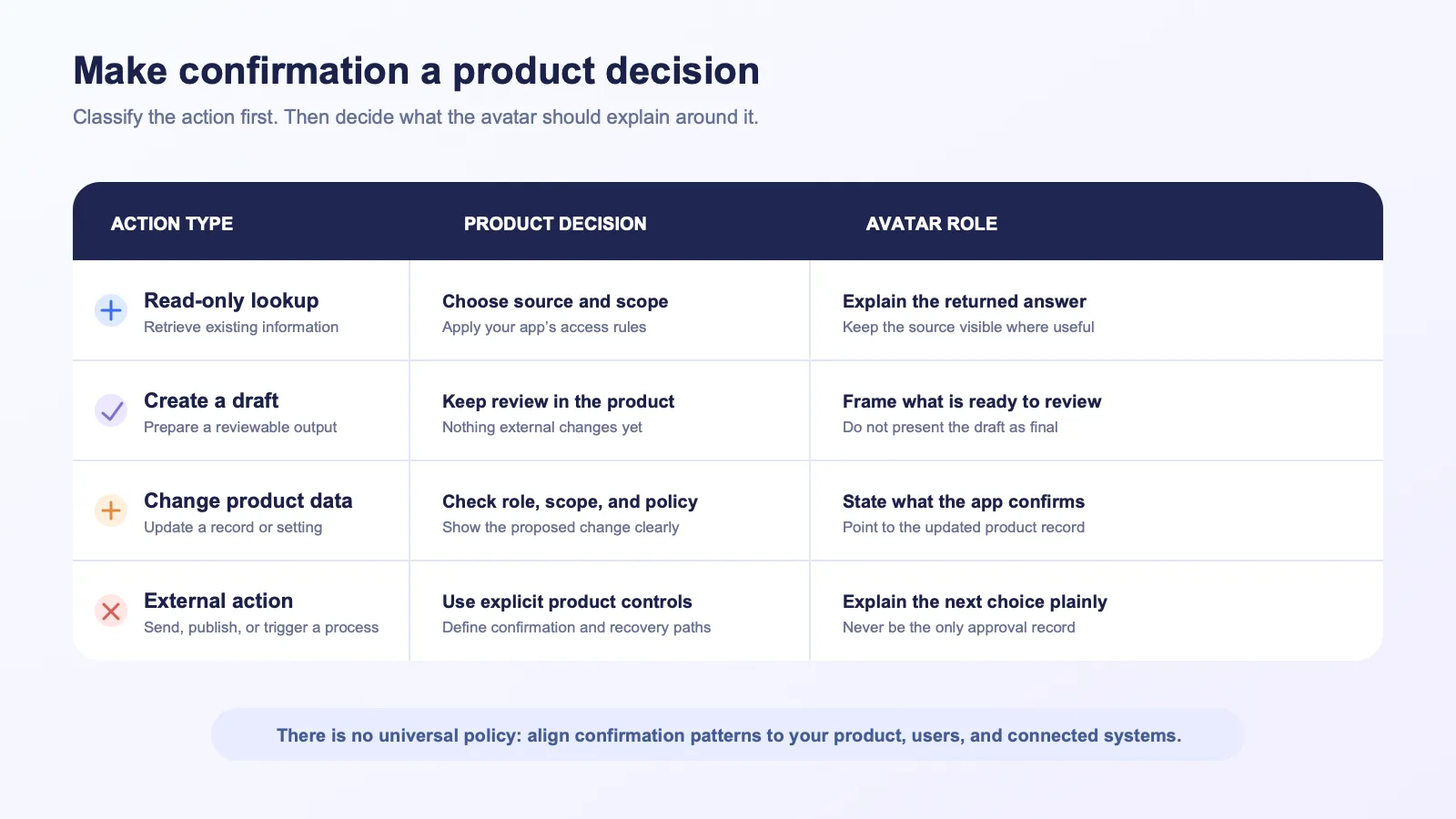
Tool calls do not all carry the same consequence. A read-only lookup, a draft, a record update, and an external send should not all be presented the same way. Your product team should decide the confirmation policy based on the action, the role, and the workflow context.
The avatar can phrase that moment clearly—for example, “I’m ready to create the draft. Review the details and confirm when you’re ready.” But the visible product control and your application policy should determine whether the action proceeds.
A practical classification to review with product and engineering
| Action type | Design question | Product pattern |
|---|---|---|
| Read-only lookup | Does the user need to know which source was queried? | Show the source or scope where it matters; let the avatar summarize the answer after the app receives it. |
| Create a draft | Can the user review before anything changes externally? | Present a draft in the product UI; let the avatar frame what is ready for review. |
| Change product data | What object changes, and who is allowed to make the change? | Make the change and its scope visible; apply your normal permission and confirmation rules. |
| External or irreversible action | What should the user approve, and what recovery path exists? | Use an explicit confirmation and clear status; do not let a spoken phrase look like the only record of approval. |
This table is a design starting point, not a universal policy. The right workflow depends on your product, customer commitments, risk model, and the systems being connected.
Make system state visible before the avatar speaks
Tool-driven experiences tend to feel untrustworthy when the avatar announces success before the application has a confirmed result—or when users cannot tell whether a request is still running.
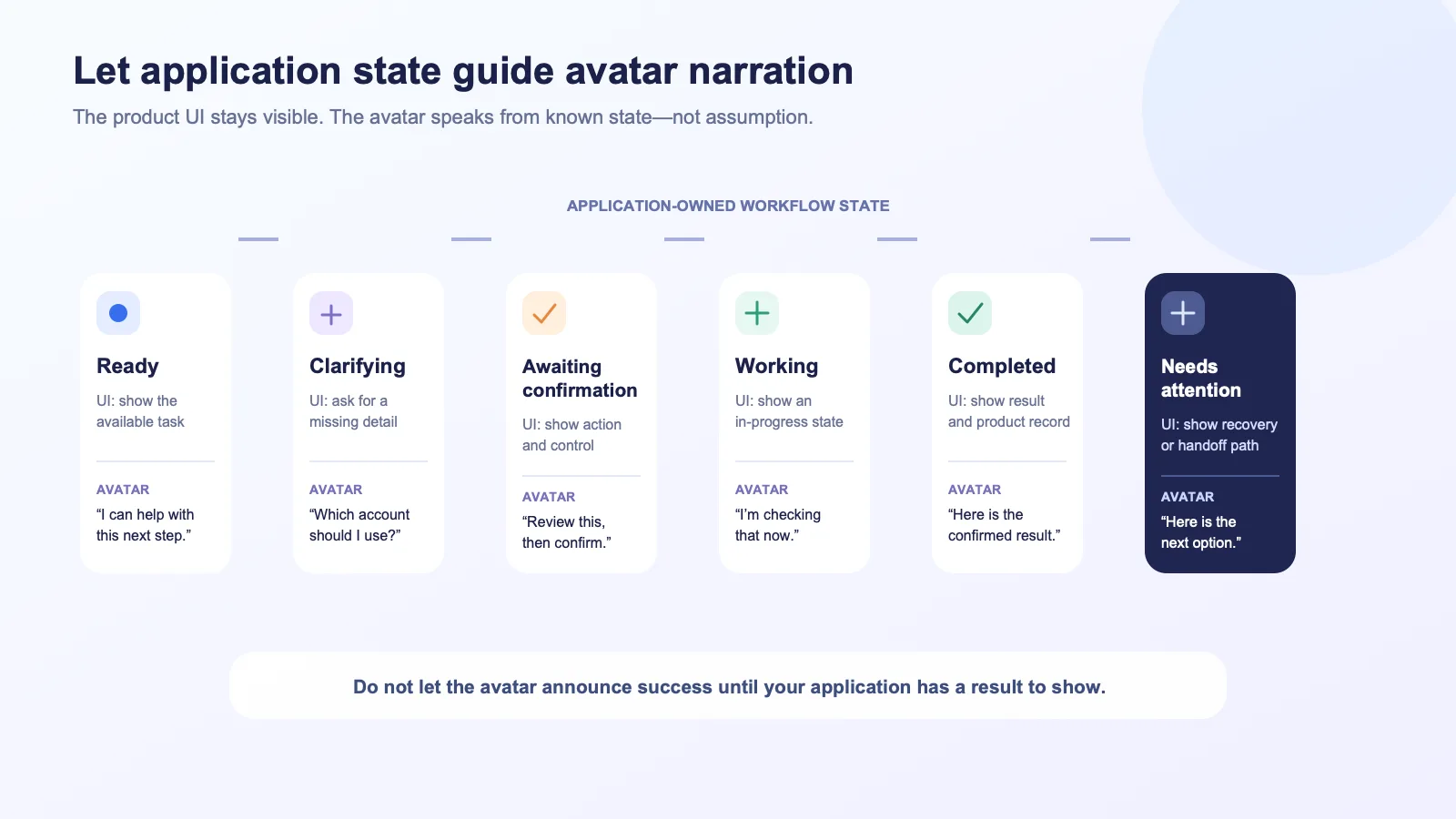
Model the interface around a small set of application-owned states instead:
- Ready: the user can see what the agent can help with and what action is available.
- Clarifying: the application needs a missing detail before it can determine the next step.
- Awaiting confirmation: the user can see the proposed action and decide whether to proceed.
- Working: the application is waiting for a tool or service response.
- Completed: the product has a result it can show, link, or record.
- Needs attention: the result is incomplete, failed, or requires another person or route.
The avatar’s wording should be tied to one of these states. That prevents overconfident narration and keeps visual, spoken, and logged outcomes aligned.
Do not hide the result behind the conversation
If a tool changes a record or produces a report, users should be able to inspect the actual object, data, or status in the product. A spoken recap is useful; it is not a replacement for a visible result.
For a long or complex result, let the avatar lead with the conclusion and point to the relevant product surface: “The report is ready. I’ve opened the exceptions that need review.” The product UI should show whether that is true, what the exceptions are, and what the user can do next.
Keep the tool path and the avatar path independently testable
An avatar layer should not make it harder to reason about the underlying workflow. Test the tool path without the avatar, then test the avatar as a separate presentation path around known states.
This separation is useful during rollout. If the tool result is correct but the avatar experience is unavailable, your product can still show the result in its standard UI. If the application cannot safely complete the tool path, the avatar should present the same recovery state rather than improvising an answer.
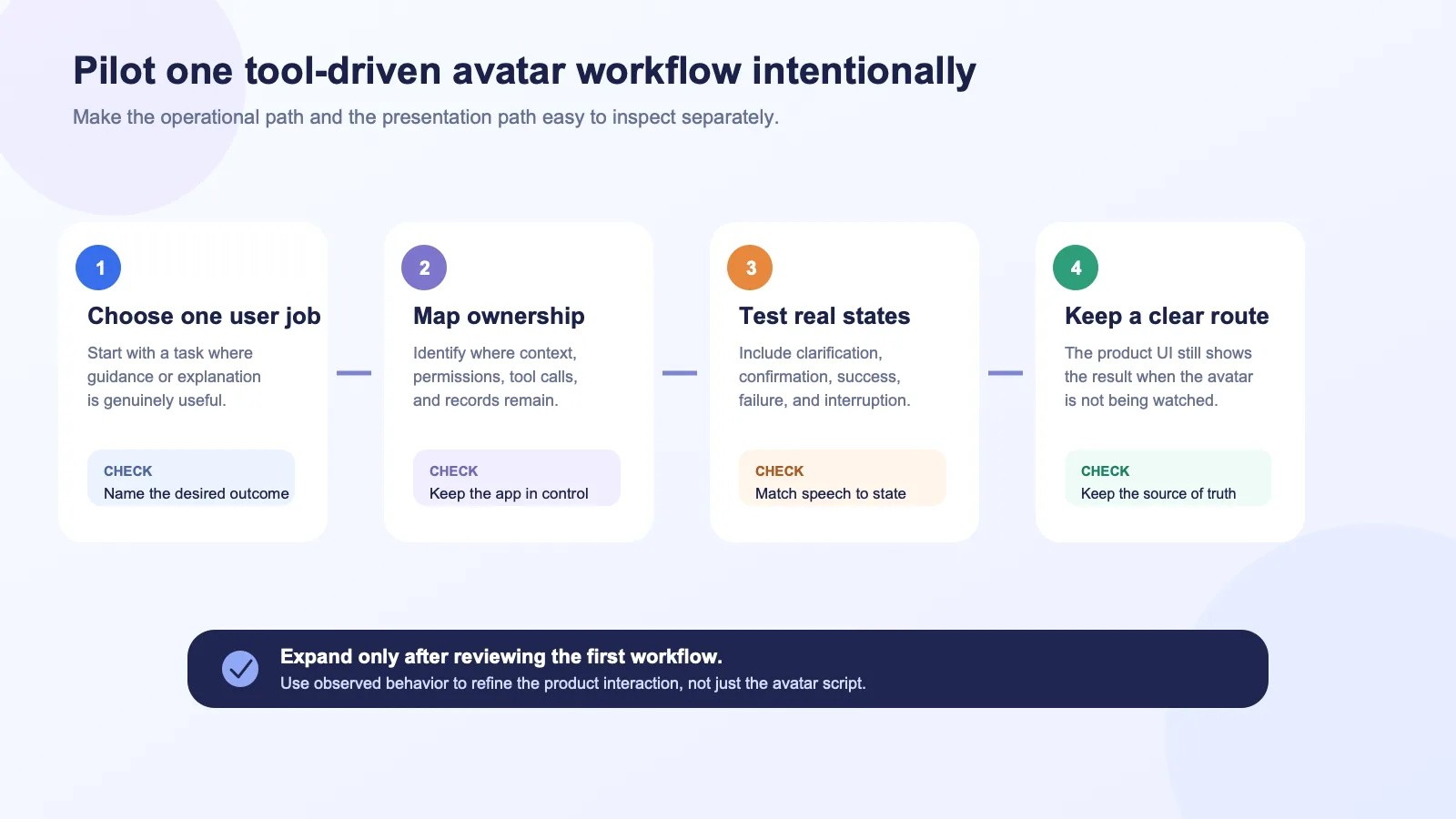
Use a narrow first workflow—for example, explaining a completed configuration check or guiding a user through a reviewable draft. Avoid making the first pilot the only path for a high-consequence action.
A build checklist for product teams
Before implementation, make sure one team can answer each of these questions plainly:
- What exact user job is this avatar helping with?
- Which application component selects and executes the tool?
- Where do permissions, confirmation rules, and audit records live?
- What can the avatar say before a result is known, while the tool is running, and after a result returns?
- Which visual control or record remains the source of truth?
- What happens if the user interrupts, declines, navigates away, or chooses text instead?
- What does the product show if the tool fails or needs human review?
- Is the speech audio sent to Spatius limited to the response your application has chosen to present?
- Which Spatius integration path matches the existing architecture?
For that final question, start with Spatius’s integration-path guide and then review the documentation for the selected path. Spatius documents Direct Mode, LiveKit Agents, Agora Convo AI, and Backend Mode as distinct paths; the appropriate one depends on where your application already owns the runtime. See the docs map.
FAQ
Does Spatius call my product’s tools?
No. Spatius’s documented role is to convert avatar speech audio into real-time motion data and support local avatar rendering through AvatarKit. Your application, agent framework, or backend owns conversation logic and tool workflow decisions. Developer docs map.
Does Spatius return a finished avatar video after a tool runs?
No. Spatius documents motion data output and local AvatarKit rendering, not finished-video delivery. Developer docs map.
Can an avatar explain the outcome of a tool call?
Yes—when your application has received the result and has selected a response to present. Keep the product UI, record, or status indicator visible so the user can inspect the source of truth.
Should every tool action require an explicit confirmation?
There is no universal interaction rule. Classify the action, its effect, the user’s role, and your product policy. Make any required confirmation visible in the product, and let the avatar explain the choice rather than act as the only approval record.
What should the avatar say if a tool call fails?
Use wording that matches the application state: state what could not be completed, avoid claiming a result, and point to the actual recovery option your product offers—such as retry, review, or a handoff route.
Build an avatar layer that respects the workflow
The most credible tool-driven avatar experiences make the underlying product easier to understand without pretending that the avatar is the product’s operating system. Keep decisions and execution in your app. Keep state visible. Then use the avatar to explain the right moment in a way that feels present, clear, and consistent with the result on screen.
If you are mapping a real-time avatar layer onto an existing SaaS workflow, request a Spatius demo to discuss the integration path that fits your architecture.
Sources
- Spatius Developer Docs Map — product boundary, integration paths, canonical terms.
- Spatius Direct Mode Integration — client audio-to-motion flow, Session Token role, and local rendering.
- Choose Your Integration Path — selecting an integration approach for an existing architecture.