

An AI avatar can make a product interaction feel more conversational. It cannot make uncertainty disappear.
When a response needs more work, a dependency is unavailable, or a user needs a person, the product still has to answer a few basic questions: Is anything happening? What has been completed? Can I stop or continue another way? Who owns the next step?
Those questions should be answered by the SaaS product—not left to an animated face, a spinning indicator, or an optimistic message such as “Just a moment.” In the current Spatius architecture, Motion Server converts avatar speech audio into real-time motion data and AvatarKit renders the avatar locally. Your application, agent framework, or backend owns the conversation logic, including ASR, LLM, TTS, turn-taking, tools, workflow state, and human handoff. Spatius’ Developer Docs Map describes that boundary.
That division is helpful for experience design. The application knows whether a task is waiting, safe to retry, blocked by permission, or ready for a teammate. The avatar can present the user-approved message and motion associated with that state.
Key takeaways
- Model the experience around clear product states—not around whether the avatar is currently moving.
- Your application should own task status, tool execution, user input, recovery, escalation, and the decision to involve a human.
- A useful waiting state explains the scope of the work, preserves the user’s ability to leave or change course, and does not invent a completion time.
- Error messages should preserve the task and offer a meaningful next step: retry, continue another way, provide more information, or request help.
- In Direct Mode, the documented audio-only fallback can keep avatar audio playing if the Motion Server WebSocket fails within the first 15 seconds. It is a narrow rendering fallback—not a substitute for your product’s error or handoff design.
Start with a user-facing state model
Technical events are not the same as user-facing states. “Tool call started,” “token expired,” or “connection lost” may be important in logs, but they do not tell a customer what they can do next.
Begin by naming the states a user can recognize. Keep the set small enough that the whole team can use it consistently in product copy, analytics, support, and QA.
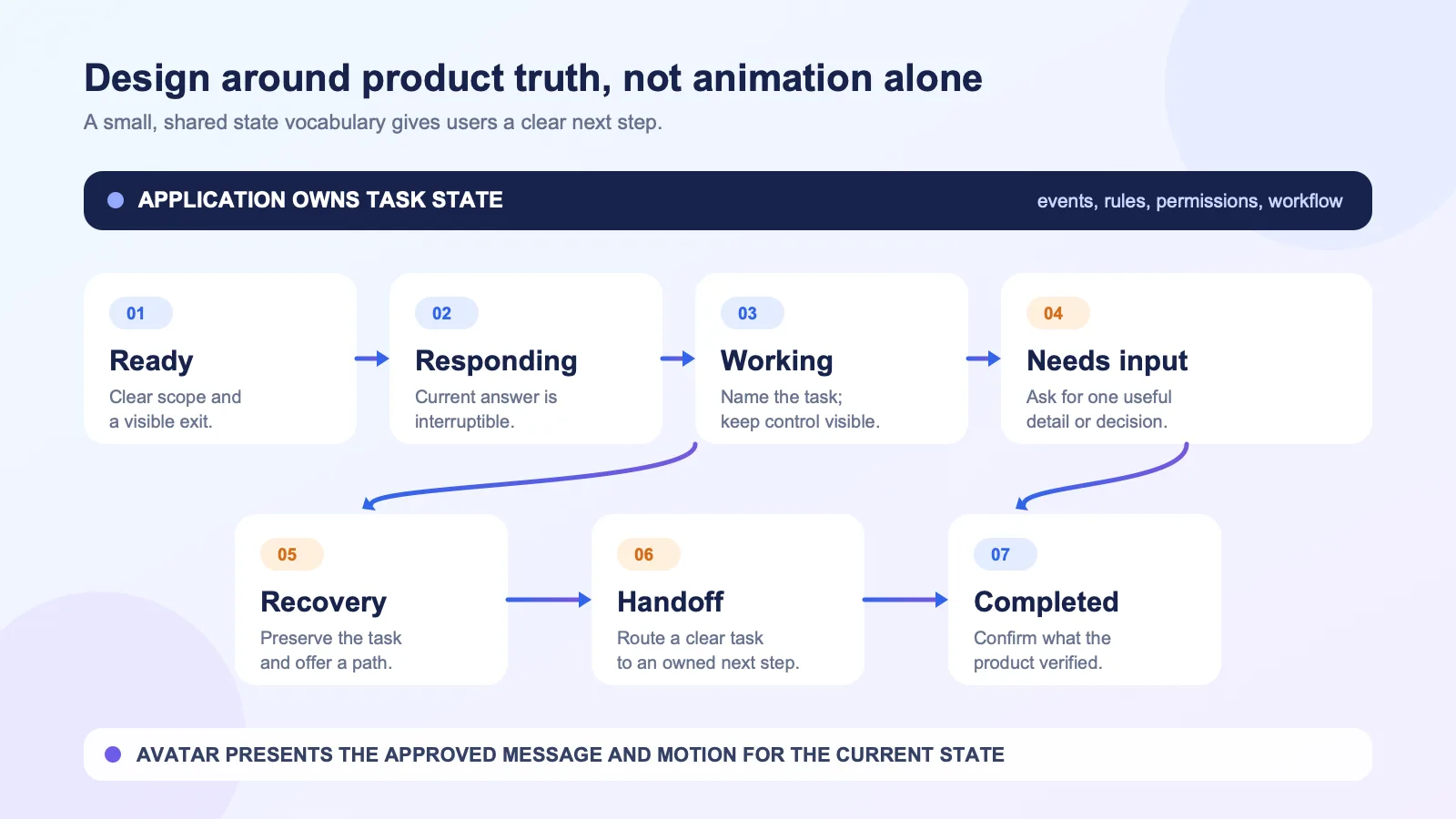
| User-facing state | The product needs to answer | Useful UI behavior | Keep this ownership in the application |
|---|---|---|---|
| Ready | What can this assistant help with here? | Give one context-specific starting action and an exit path. | Eligibility, feature scope, and permissions. |
| Responding | Is the avatar answering the current request? | Present the answer and a visible way to interrupt, mute, or switch mode where relevant. | Turn-taking and the decision to produce the response. |
| Working | What is the product doing, and can I still act? | Name the task at the right level of detail; keep a cancel, back, or alternative path when the workflow permits it. | Tool calls, workflow progress, and task cancellation. |
| Needs input | What is missing before the product can continue? | Ask a specific question, show the required field or choice, and preserve prior context. | Validation and the decision that more input is needed. |
| Recovery | What did not complete, and what can I do now? | Use plain language, retain the task where possible, and offer a next action. | Error classification, retry policy, and state preservation. |
| Human handoff | Who will take over, and what happens to my task? | State the handoff path and the user’s next action without implying an unavailable person is already responding. | Routing, staffing, permissions, and the handoff record. |
| Completed | What changed, and what should I do next? | Confirm the visible result and point to the next useful product action. | The source of truth for task completion. |
The avatar should not pretend to know more than the product knows. If an external system has not confirmed a change, use language that reflects that boundary. For example, “I’m preparing the request for review” is different from “Your request is complete.”
Separate task state from avatar presentation
The simplest way to avoid confusing UX is to keep two models distinct:
- The application task model determines what is happening in the workflow.
- The presentation model determines what the user sees and hears about that task.
Spatius belongs to the presentation side of that model. A product may use speech audio that it has already decided the avatar should say; Motion Server returns motion data, and AvatarKit renders the result locally. The product’s agent stack retains responsibility for the decision to call a tool, wait for a result, retry, ask for input, or involve a person. Choose Your Integration Path makes the same distinction: Spatius is an avatar-only service, while conversation logic and turn-taking are owned by the application or chosen agent framework.
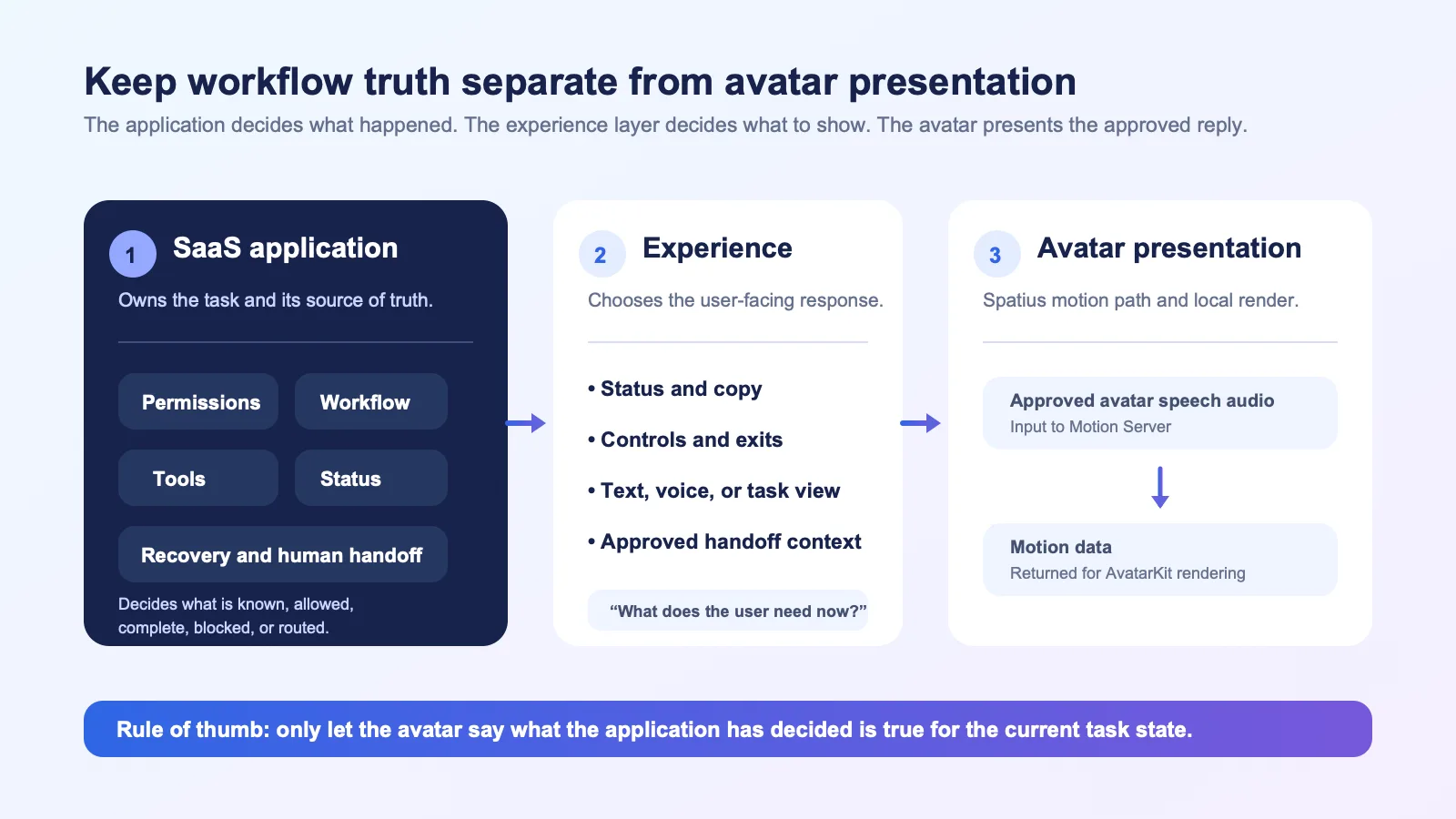
| Layer | What it should decide | Example question |
|---|---|---|
| Application and agent layer | User permissions, request intent, knowledge and tool access, workflow state, recovery, and routing. | “Can this user submit this request, and did the downstream system accept it?” |
| Experience layer | Which status, control, text, or audio message is appropriate for the current task state. | “Should the user see a progress message, a form, or a handoff option now?” |
| Avatar presentation layer | How the approved avatar speech is represented visually. | “What motion should accompany the speech audio we chose to play?” |
This is not merely an engineering diagram. It prevents a common product mistake: giving the avatar a vague “thinking” behavior while the actual task is in an unknown state. Users need product truth first and personality second.
Make waiting states specific, but not overconfident
Waiting can be a legitimate part of a workflow. A user may be asking the application to consult a product record, prepare a draft, run a permitted tool, or wait for a business process that has its own rules. The goal is not to narrate every internal event. The goal is to establish a credible contract with the user.
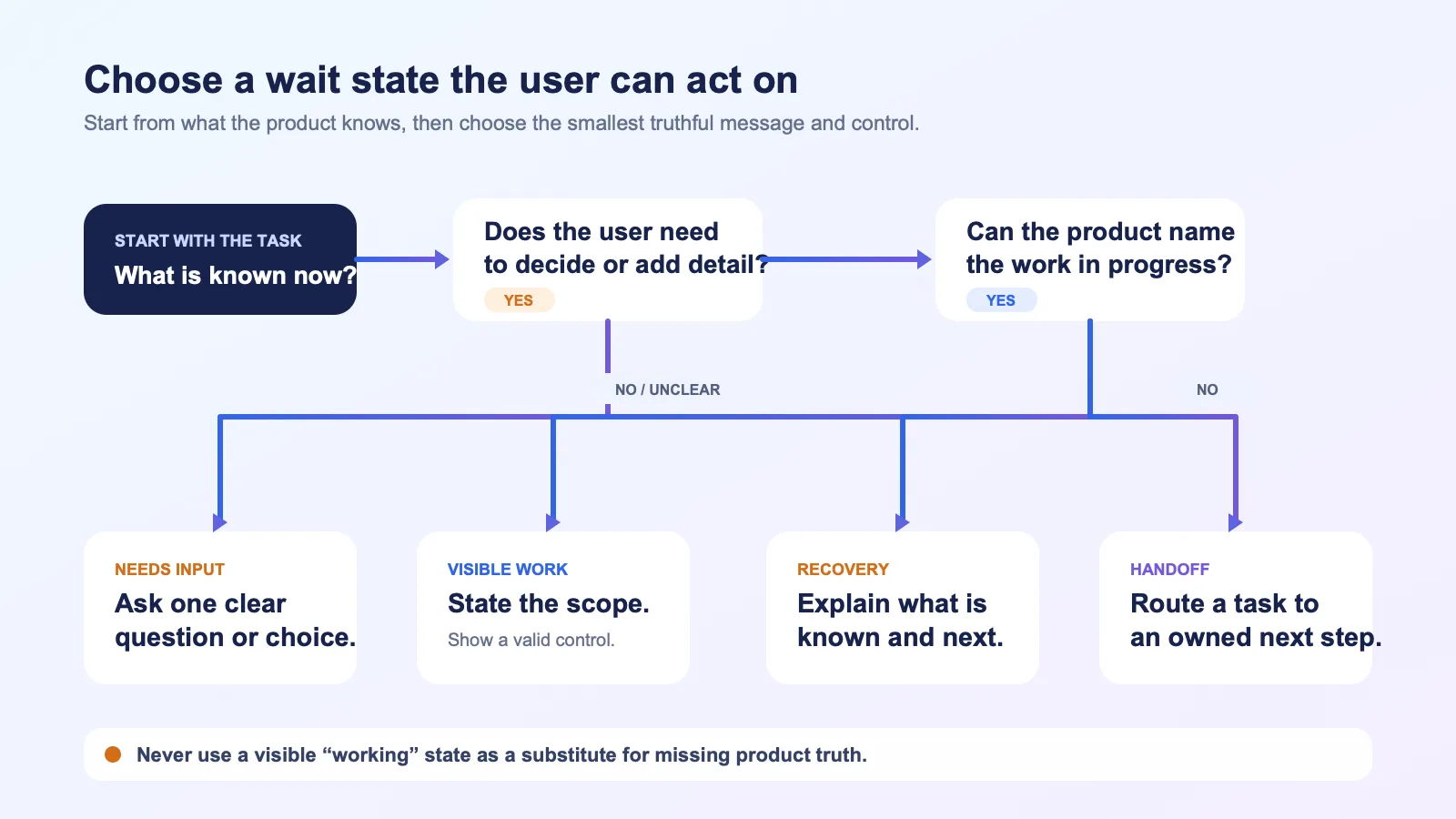
A good waiting state has three parts:
- Scope: state the work at the level the user can understand.
- Control: show what the user can still do—wait, cancel, switch to text, add missing details, or leave and return if the workflow supports it.
- Outcome boundary: do not promise a result, timing, or action before the application can verify it.
Write status copy that tells the truth
Avoid treating the avatar as a decorative loading animation. The wording should reflect the actual state your app can observe.
| Situation your application recognizes | Better user-facing message | Why it works |
|---|---|---|
| A permitted task is in progress | “I’m checking the details for this request.” | Gives the user a meaningful scope without claiming an outcome. |
| The product needs a value or choice | “I need one more detail before I can continue.” | Turns a pause into a concrete next step. |
| The request needs review or an approval path | “This needs a teammate to review before it can move forward.” | Sets a boundary without pretending that a human is already engaged. |
| The user can continue without the avatar | “You can keep going in text while this view is unavailable.” | Provides an alternate interaction without implying the whole task has failed. |
Do not show a detailed internal status merely because it is available in logs. A message such as “Calling API 4 of 7” can make a user anxious while revealing nothing actionable. Conversely, “Working on it” is too vague if the product is about to request a decision. Choose the smallest truthful explanation that helps the user decide what to do next.
Preserve agency during a wait
Whether a control is feasible depends on the workflow, but the design question should always be asked:
- Can the user interrupt the current response?
- Can they correct or add information without starting over?
- Can they use text instead of voice or animation?
- Can they leave the view and return to a durable task state?
- If the task has started an external action, can the product clearly show whether that action is still pending, completed, or needs review?
The answers are application decisions. The avatar should mirror those choices, not hide them.
Design recovery around the task, not the transport
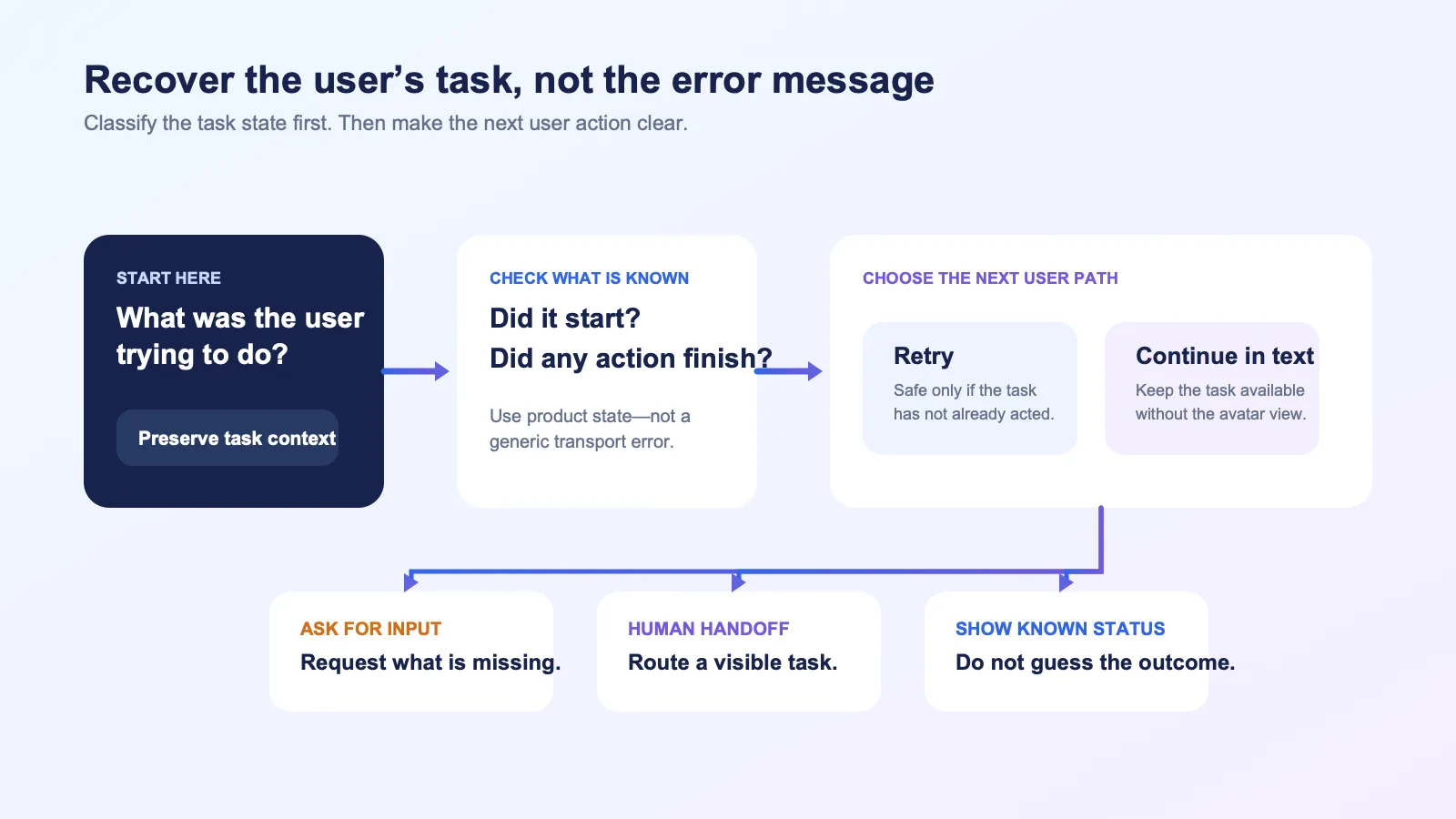
Users rarely benefit from a raw connection or model error. They benefit from knowing whether their request was received, whether anything changed, and what path remains available.
Build recovery around the task the user was trying to accomplish. The product may need to distinguish a presentation problem from a workflow problem, but it should not force the customer to debug the architecture.
| What is affected | What the product should determine first | Useful recovery choice |
|---|---|---|
| The answer or task did not start | Did the application receive the request, and is it safe to attempt again? | Retry, edit the request, or use another supported channel. |
| A tool or downstream step did not complete | Was any part of the action accepted or completed? | Show the known status; ask for a required detail; offer review or handoff if appropriate. |
| The avatar presentation is unavailable | Can the user continue with the same approved content in another interface? | Continue in text or audio if your product supports it; avoid treating the avatar view as the source of truth. |
| The user lacks access or approval | Is this a permission boundary, a missing role, or a workflow that needs a person? | Explain the next authorized path rather than asking the user to repeat the request. |
Use the documented Direct Mode fallback precisely
The current Direct Mode documentation states that if the Motion Server WebSocket connection fails within 15 seconds, the SDK enters an audio-only fallback: audio continues to play without animation. That is useful as a rendering-path behavior to understand when you choose Direct Mode.
It is not a complete error experience. Your application still decides whether the user’s task is available, what status to display, how to recover a failed workflow step, and whether a human handoff is appropriate. Do not turn a technical fallback into a blanket promise about service availability or user outcomes.
Treat human handoff as a workflow, not a sentence
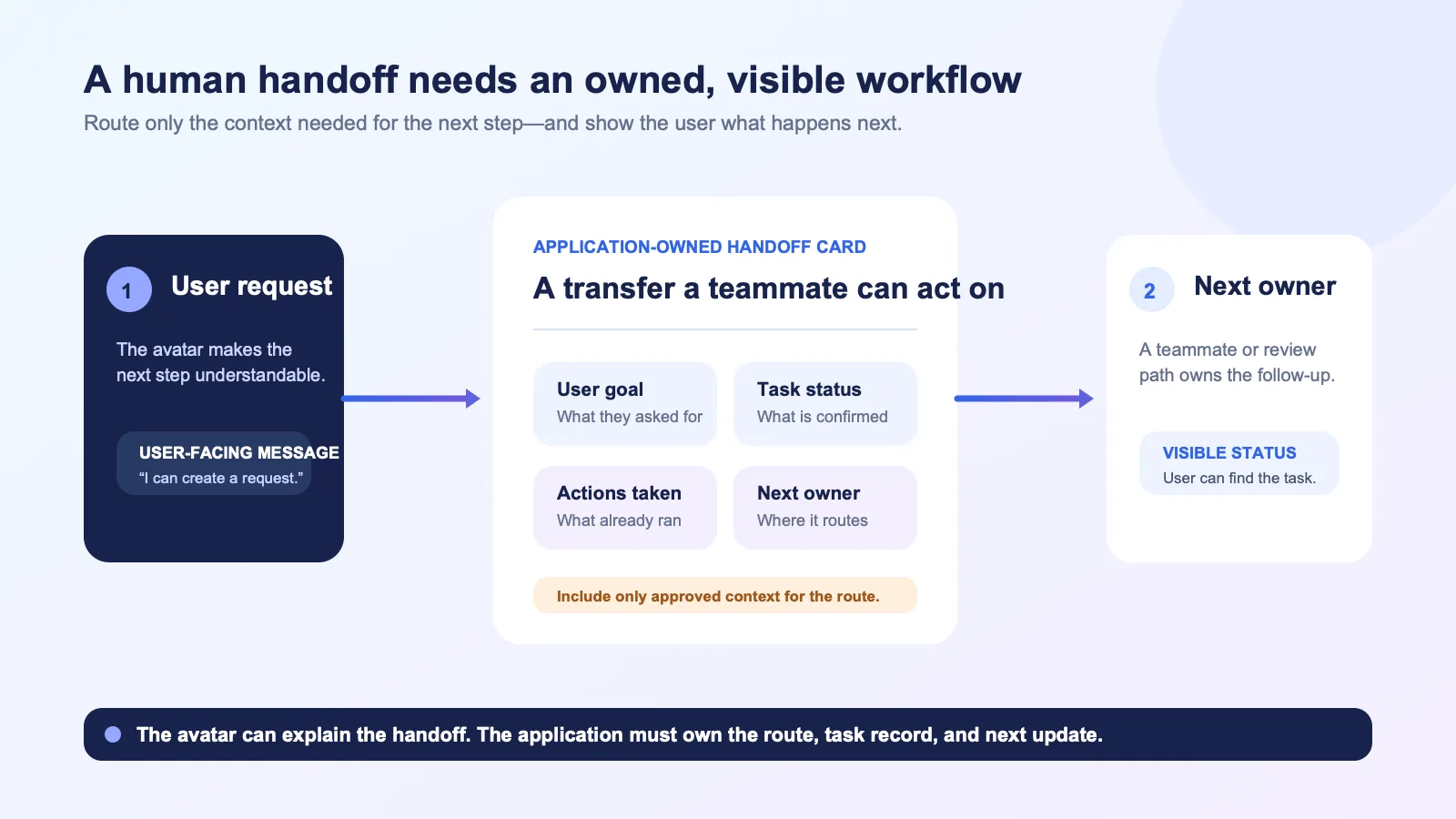
“Let me connect you with a human” can be useful copy only if the product knows what happens next. A human handoff is a workflow with a route, context, ownership, and a user-visible expectation.
The application should decide when to offer or initiate one. Common triggers may include a user explicitly asking for a person, a task requiring a role the assistant does not have, an approval that needs review, or a workflow the product has deliberately scoped out of automation. The correct trigger depends on your product and policy; the avatar should not invent one on its own.
Define the handoff contract before designing the dialogue
| Moment | The user should understand | The application should own |
|---|---|---|
| Before handoff | Why the current path cannot continue and what alternatives exist. | Eligibility rules, permissions, and whether a handoff can be offered. |
| At handoff | What is being sent or recorded, who is expected to take the next step, and what the user can do now. | Routing destination, approved summary, task state, and any review or consent flow your product requires. |
| After handoff | Where to find the request and what status is known. | Ownership, updates, and the source of truth for the next action. |
Keep the context transferable and reviewable. A useful handoff record often includes the user’s stated goal, the current task status, information the user has already provided, actions the product has confirmed, and the next question or owner. That does not mean every transcript or internal note should be copied automatically. Your application should decide what is necessary for the handoff, what the user should see, and what your internal policies require.
Keep the avatar’s language bounded
The avatar can say that the product is handing off, asking for approval, or offering a support route. It should not imply a service-level response time, a guaranteed human availability, or that a teammate has already reviewed something unless the application can verify those facts.
For example:
- Prefer: “I can create a request for the support team with the details you entered.”
- Avoid: “A specialist is reviewing this now,” unless that status is confirmed by your application.
That precision helps support and product teams investigate what actually happened. It also avoids creating an experience that sounds reassuring but leaves the user with no visible next step.
Implement the experience in layers
You do not need to perfect every imaginable failure before learning from a focused pilot. You do need a shared model that prevents a misleading launch.
1. Define a small state vocabulary
Agree on the labels, entry conditions, exit conditions, and controls for the states in this article. Reuse them across UI components, audio scripts, support documentation, and telemetry.
2. Connect real product events to those states
Map the application’s durable events—not animation events—to the user-facing experience. For example, a tool result, a permission check, or a handoff record may change the state. The avatar message follows that decision.
3. Prepare an alternate presentation path
Decide what a user sees if voice or avatar presentation is unavailable. This may be text, an audio-only state, a task record, or another product surface. The right option depends on your product; do not assume the visual avatar is required for the workflow to remain understandable.
4. Test recovery with realistic task states
Test a request that has not started, one that is partially complete, one that needs input, one that needs approval, and one that must be handed to a person. Test not only the message, but also whether the product preserves the correct context and next action.
5. Choose an integration path that matches runtime ownership
Spatius supports Direct Mode, platform integrations, and Backend Mode. The integration guide explains which component connects to Motion Server for each path. Select the path that fits the runtime your team already owns, then design the user-facing states around your product’s workflow—not around a generic protocol diagram.
Pre-launch checklist
Before exposing an avatar experience to a wider audience, review these questions with product, engineering, support, and the owners of the underlying workflow:
- Can a user tell the difference between a response, an in-progress task, a request for input, and a handoff?
- Does every wait state have a truthful scope and at least one understandable next step?
- If the product shows a “completed” message, what verified application event supports it?
- Can a user recover from a presentation issue without losing the task they were trying to complete?
- Do retry controls avoid duplicating or obscuring an action that may already have been accepted?
- Is the human handoff route real, owned, and visible to the user after it is created?
- Does the avatar script avoid claiming a response time, availability, approval, or outcome that the application cannot verify?
- Have you tested the Direct Mode audio-only fallback separately from application-level task and error states, if you use that integration path?
Common mistakes to avoid
Treating animation as proof of progress
An avatar can continue to gesture while the business workflow is paused, blocked, or complete. Use a product state—not animation alone—to determine what the user is told.
Making “retry” erase the customer’s work
If the user has already supplied details or started a task, preserve the relevant context where it is safe to do so. A retry should not become a request to repeat the entire interaction without explanation.
Hiding an error behind a friendly personality
Warm language can reduce friction, but it cannot substitute for a clear status and control. State what is known, avoid speculation, and make the next path visible.
Assuming an audio-only fallback resolves the workflow
The Direct Mode fallback concerns how audio and motion are presented after a narrowly defined connection failure. It does not tell the user whether a tool action worked, whether a request is durable, or whether a teammate will take over.
Offering a human handoff without an owned route
A handoff option becomes frustrating if it creates no record, sends the user nowhere, or promises a response that nobody has agreed to provide. Design the route and ownership before writing the avatar line.
Frequently asked questions
Does Spatius decide when to show a waiting state or hand a task to a person?
No. Spatius converts avatar speech audio into motion data and AvatarKit renders the avatar locally. Your application, agent framework, or backend owns conversation logic, workflow state, turn-taking, tools, and human handoff decisions. See the Developer Docs Map.
What happens if the Direct Mode WebSocket connection fails?
According to the current Direct Mode documentation, if the connection fails within 15 seconds, the SDK enters audio-only fallback, so audio continues without animation. Your product should still provide its own task status, recovery controls, and support or handoff behavior.
Does every waiting state need an avatar message?
No. A concise text status, a form, a task record, or a quiet transition can be clearer than spoken narration. Choose the presentation that best supports the user’s current task and preserves their control.
Should we pass every conversation detail to the person who takes over?
Not by default. Define the minimum handoff context required for the teammate to continue the workflow, decide what the user should see, and review the final design with the owners responsible for your product’s data and support processes.
Can we use this article as a reliability, security, or compliance policy?
No. This article is product and UX guidance. Validate the details of your integration, workflow, customer commitments, and review requirements with the appropriate technical, security, legal, and operational owners.
Make the next step visible
The strongest AI avatar experiences do not try to hide delay, uncertainty, or escalation. They tell the user what the product knows, preserve a path forward, and let the avatar present that truth with clarity.
If you are evaluating a real-time avatar layer for a B2B SaaS workflow, request a Spatius demo to discuss an integration path that fits your existing application architecture.