

An AI avatar is most helpful when it explains, guides, or responds without taking control away from the user. The moment the user wants to speak, click, type, change direction, or complete a task, the avatar needs a clear way to yield.
That sounds like a small playback detail. In a B2B SaaS product, it is a product decision: the same rule that feels natural in a guided onboarding flow may be disruptive in an admin workflow, a support escalation, or a high-stakes action.
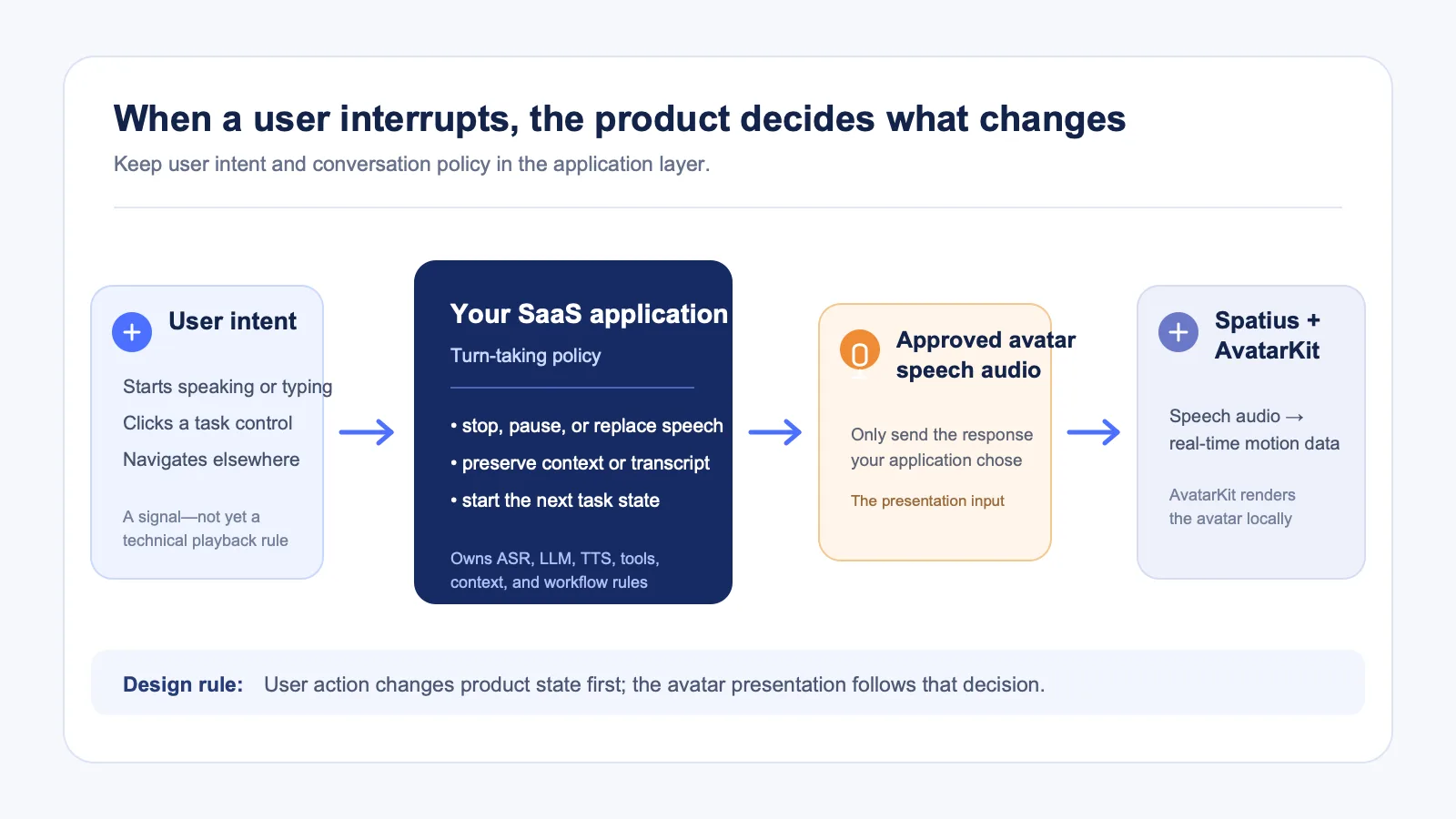
This guide explains how to design interruption behavior around user intent. It also separates the product decision from the avatar-rendering layer: your application or agent framework owns ASR, LLM, TTS, conversation state, and turn-taking. Spatius converts avatar speech audio into real-time motion data, while AvatarKit renders the avatar on the client. See the developer docs map.
Key takeaways
- Let users interrupt whenever continuing the current response is less valuable than acting on their next intent.
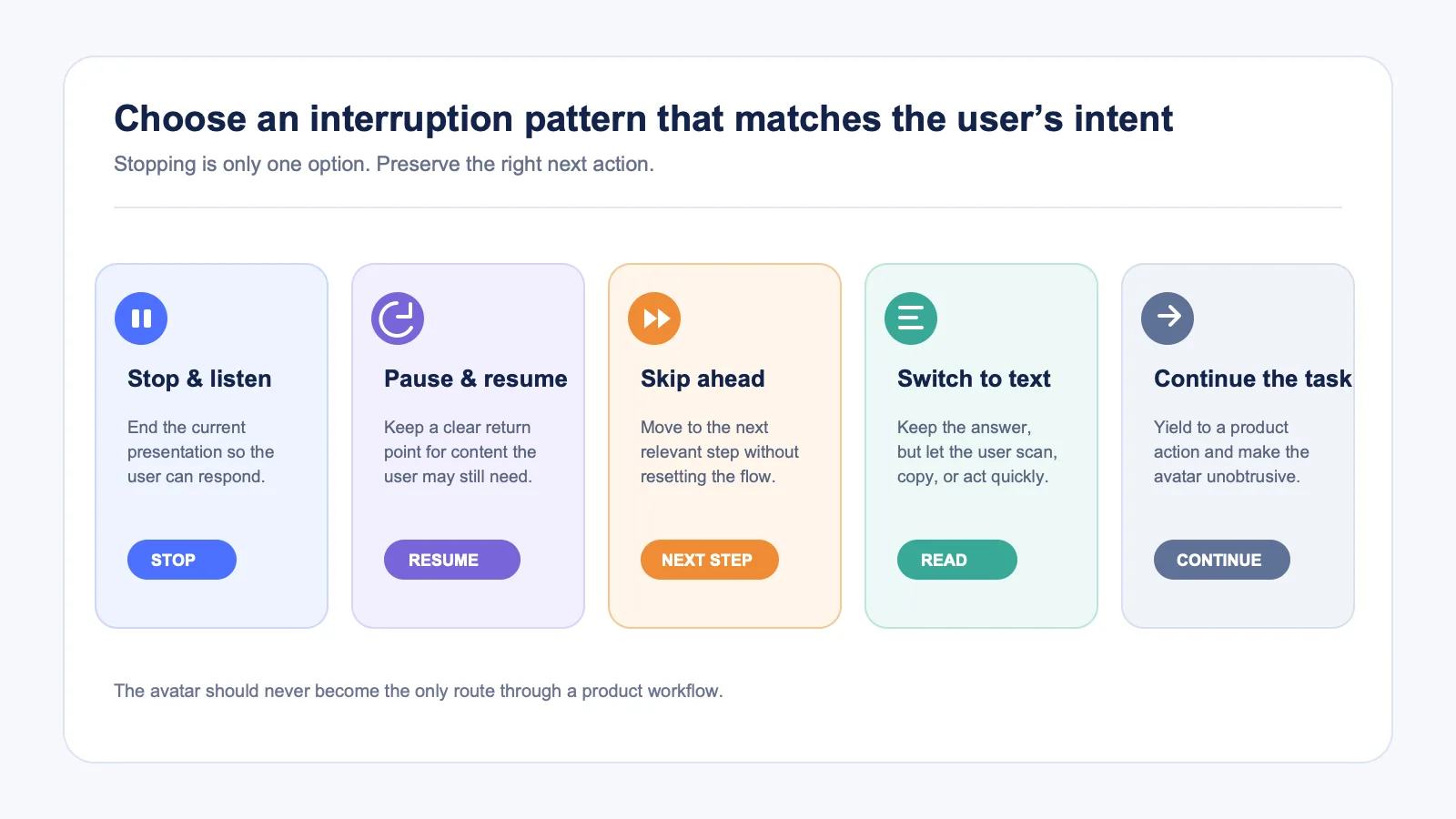
- Offer more than one kind of interruption: stop, pause, skip, switch to text, or hand off. They solve different problems.
- Treat interruption as an application policy, not as a visual effect. Your product decides when the conversation changes state and what happens next.
- Make the avatar’s state visible: speaking, paused, listening, working, or unavailable should not look the same.
- Test interruption rules in one defined workflow before applying them everywhere.
Start with the user’s right to take control
The baseline rule is simple: a user should not have to wait through an avatar response that is no longer useful.
In practice, the user might want to interrupt because they already understand the point, spot an error, need to supply missing information, or simply want to do the task themselves. A good experience recognizes those situations without assuming that every sound or click means “cancel everything.”
The useful question is not “Can the avatar be interrupted?” It is “What should the product do when a user signals a different intent?”
For each workflow, define four things before designing the controls:
- What counts as an interruption? A Stop button, user speech, typing into a field, navigation, a new prompt, or a task-specific action can mean different things.
- What should stop? Only the avatar’s playback, the current response generation, a pending tool action, or the whole workflow?
- What remains available? The user may need the transcript, the previous answer, a replay option, or a way to resume.
- What happens next? The product can listen, wait for typed input, continue a task, ask for clarification, or offer a human path.
Separate product turn-taking from avatar playback
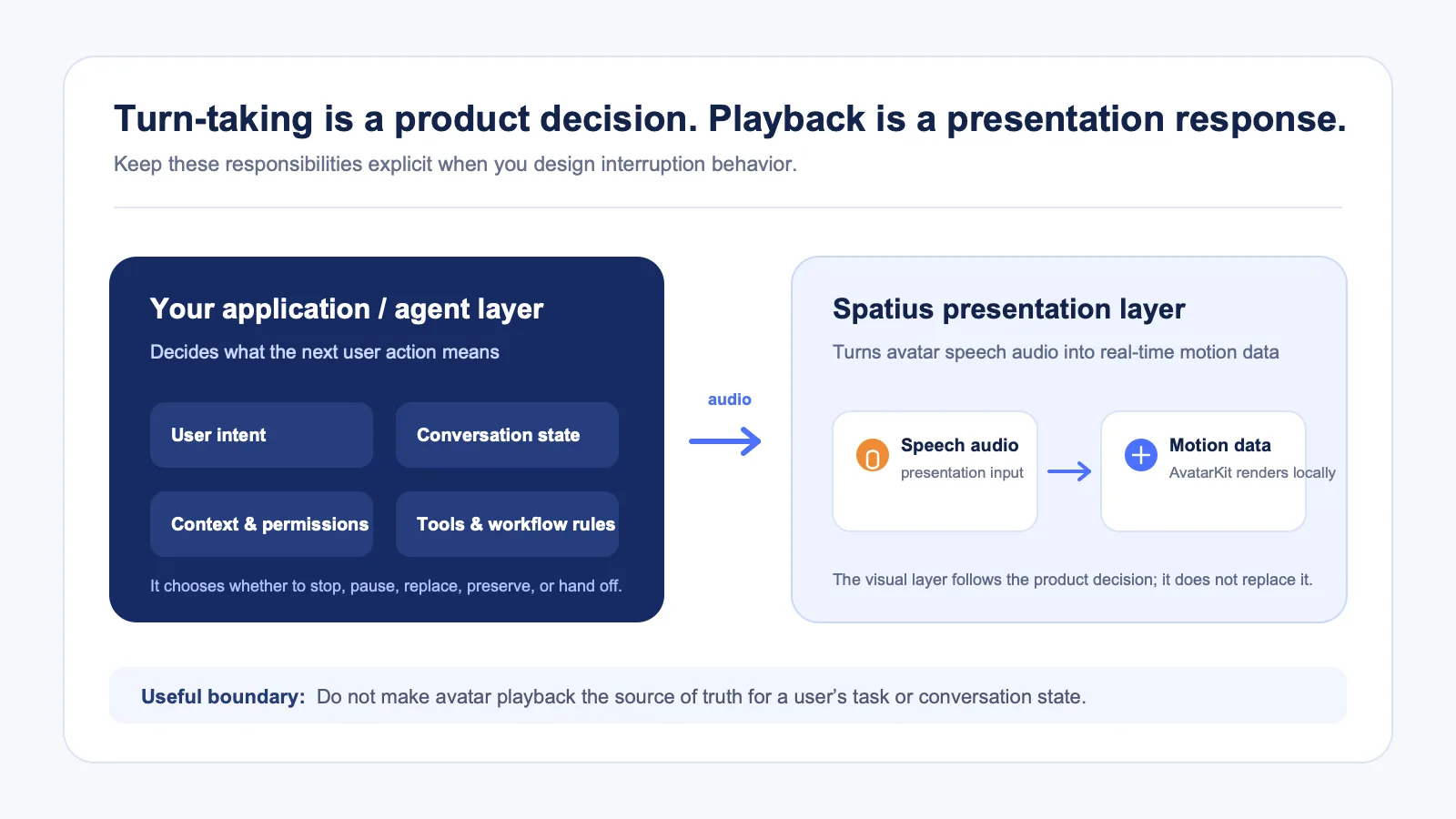
It is tempting to put all interruption behavior in one “avatar” setting. That creates confusion because the interaction has two different layers.
| Layer | Owns | Example interruption decision |
|---|---|---|
| Your SaaS product or agent framework | User intent, ASR, LLM, TTS, conversation state, permissions, tools, and workflow rules | “The user clicked Edit configuration; stop the explanation and open the form.” |
| Avatar presentation layer | The visual response to approved avatar speech audio | “The next audio segment starts; render the next avatar motion.” |
Spatius is an avatar-only service: it receives avatar speech audio and returns real-time motion data. The application, its backend, or its agent framework owns turn-taking and interruption policy. The integration-path guide states this distinction directly.
For teams using Direct Mode, AvatarKit on the client connects to Motion Server, sends avatar speech audio, receives motion data, and renders locally. The Direct Mode documentation also notes that sending new audio starts a new round and interrupts ongoing playback. That describes a playback behavior; your product still needs to decide whether a user event should stop, replace, or preserve the current response. Read the Direct Mode overview.
Use the right interruption pattern for the moment
“Interrupt” should not always mean “discard.” These patterns give users a clear outcome without asking them to learn a new interaction model each time.
1. Stop and listen
Use this when the avatar is explaining something and the user wants to ask a question or give an answer. A visible Stop control is especially useful when audio is playing. After the stop, the product can move into listening or typed-input mode.
Good fit: guided setup, product education, support triage, or a practice simulation.
2. Pause and resume
Use this for content the user may want to finish, such as a walkthrough or a longer explanation. Pausing should preserve a path to resume, while stopping should make it clear that the user is moving on.
Good fit: onboarding tours, training content, and optional feature explanations.
3. Skip to the useful part
If an avatar explains a multi-step workflow, the user may need the next step—not a conversation reset. Let them skip or jump to a related section when the content has a stable structure.
Good fit: repeatable onboarding, a product demo, or a known checklist.
4. Switch to text
Some users want the content but not the voice or visual presentation. A clear text mode can preserve the answer and let them scan, copy, or act more quickly. Do not hide the transcript behind an audio-only experience.
Good fit: busy work environments, accessibility preferences, or complex technical instructions.
5. Leave the avatar and continue the task
The strongest interruption is often not conversational at all: the user clicks a control, opens a record, edits a setting, or moves to another page. Let task actions take priority over a generic explanation. The avatar can disappear, pause, or return to an unobtrusive state rather than competing with the work.
Good fit: admin consoles, configuration, dashboards, and transactional workflows.
Decide the default with task risk, not novelty
An avatar should not be equally interruptible in every situation. The decision depends on the value of the current message, the consequence of moving on, and what the user is trying to do.
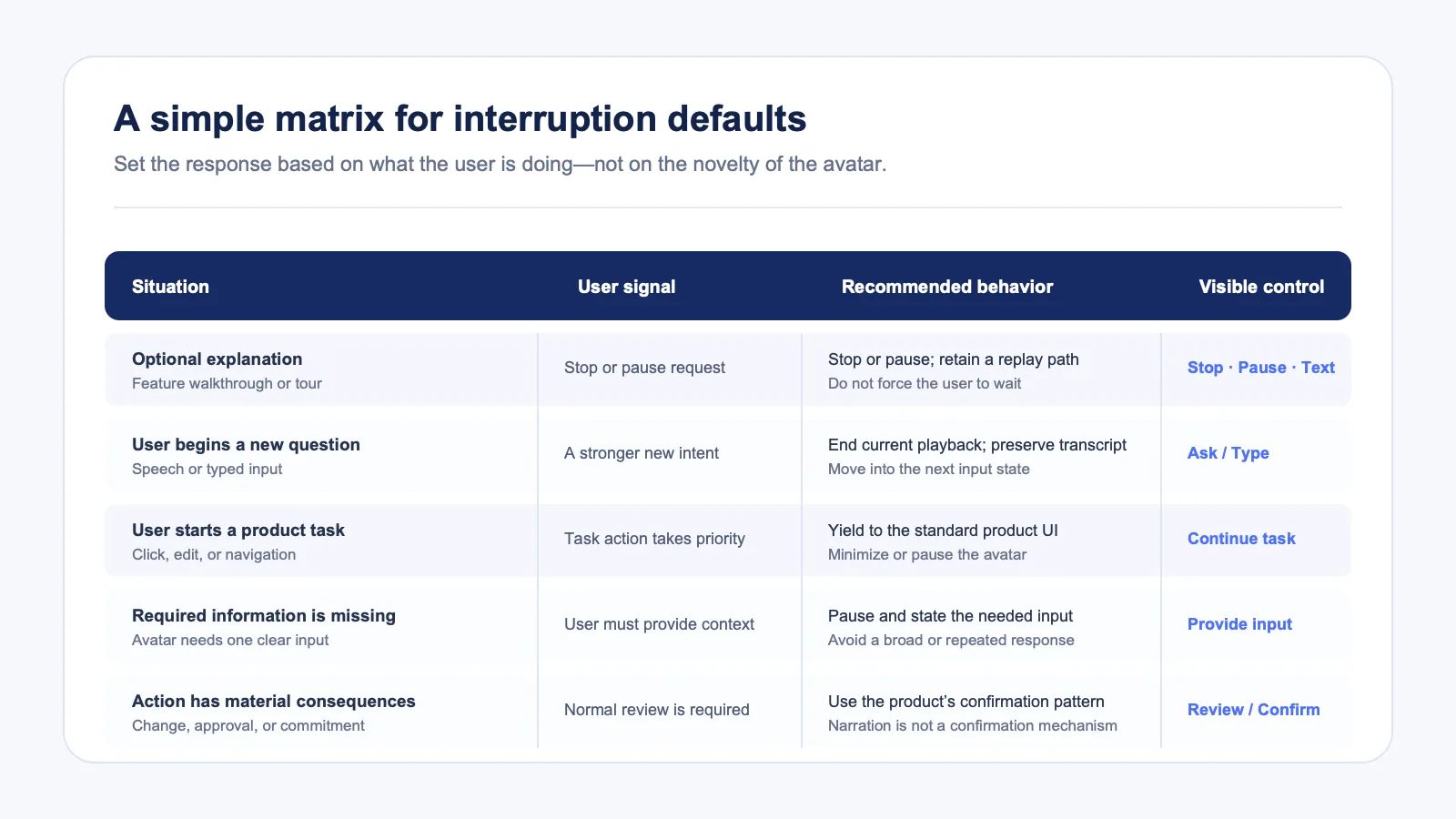
| Situation | Suggested default | Why |
|---|---|---|
| Optional feature explanation | Stop, pause, skip, and text are all available | The user is learning; control should be immediate. |
| User begins typing a new question | Stop the current response and preserve its transcript | The new input is a stronger signal than continuing narration. |
| User opens a product control or starts an in-product task | Yield to the task action | The application task is more important than presentation. |
| The avatar asks for information needed to continue | Pause and make the required input explicit | The user should know what to provide next. |
| A workflow reaches an action with material consequences | Do not use narration as confirmation | The application should use its normal review and confirmation controls. |
| A background process is still working | Allow the user to leave, see status, or continue in text | The avatar should not become a blocking waiting room. |
This table is a starting point, not a universal policy. A sales-practice tool may choose fast conversational barge-in. A configuration flow may prefer explicit buttons because a stray microphone event should not accidentally cancel useful guidance. Define the rule per workflow and test it with the people who use that workflow.
Make state changes obvious
Many interruption problems are not caused by the rule itself. They happen because the product changes state without showing the user what happened.
Use a small, durable state model. It should work even when the avatar is minimized or hidden:
- Speaking — the avatar is presenting an approved response; show Stop and a text option.
- Paused — the current content can resume; show Resume and End.
- Listening or ready for input — the user can speak or type; do not continue talking over them.
- Working — the application is processing something; show the task and a non-blocking way to leave.
- Needs clarification — explain the one missing input rather than continuing a broad response.
- Handed off — show who owns the next step and retain context that is appropriate for the application.
Avoid an avatar that appears to keep “thinking” after the product has already moved on. The visual state should match the product state, not merely the last animation frame.
Keep interruption rules close to the workflow
The best rules are rarely global. A user may want very different behavior in a demo, an onboarding checklist, an analytics dashboard, and a support flow.
Build an interruption policy alongside the workflow definition:
| Workflow question | Decision to document |
|---|---|
| What is the user’s primary job here? | The task that takes precedence over avatar narration. |
| What signals a new intent? | Speech, typing, a control click, navigation, or an explicit stop. |
| Which content is recoverable? | Transcript, replay point, summary, and links to related product areas. |
| What should never be automatic? | High-impact actions, irreversible changes, or actions that need normal product confirmation. |
| What is the non-avatar fallback? | Text, standard UI, support route, or a human handoff within your product. |
This keeps the avatar from becoming a separate product inside your product. It stays connected to the task and gives the user a predictable way back to the normal interface.
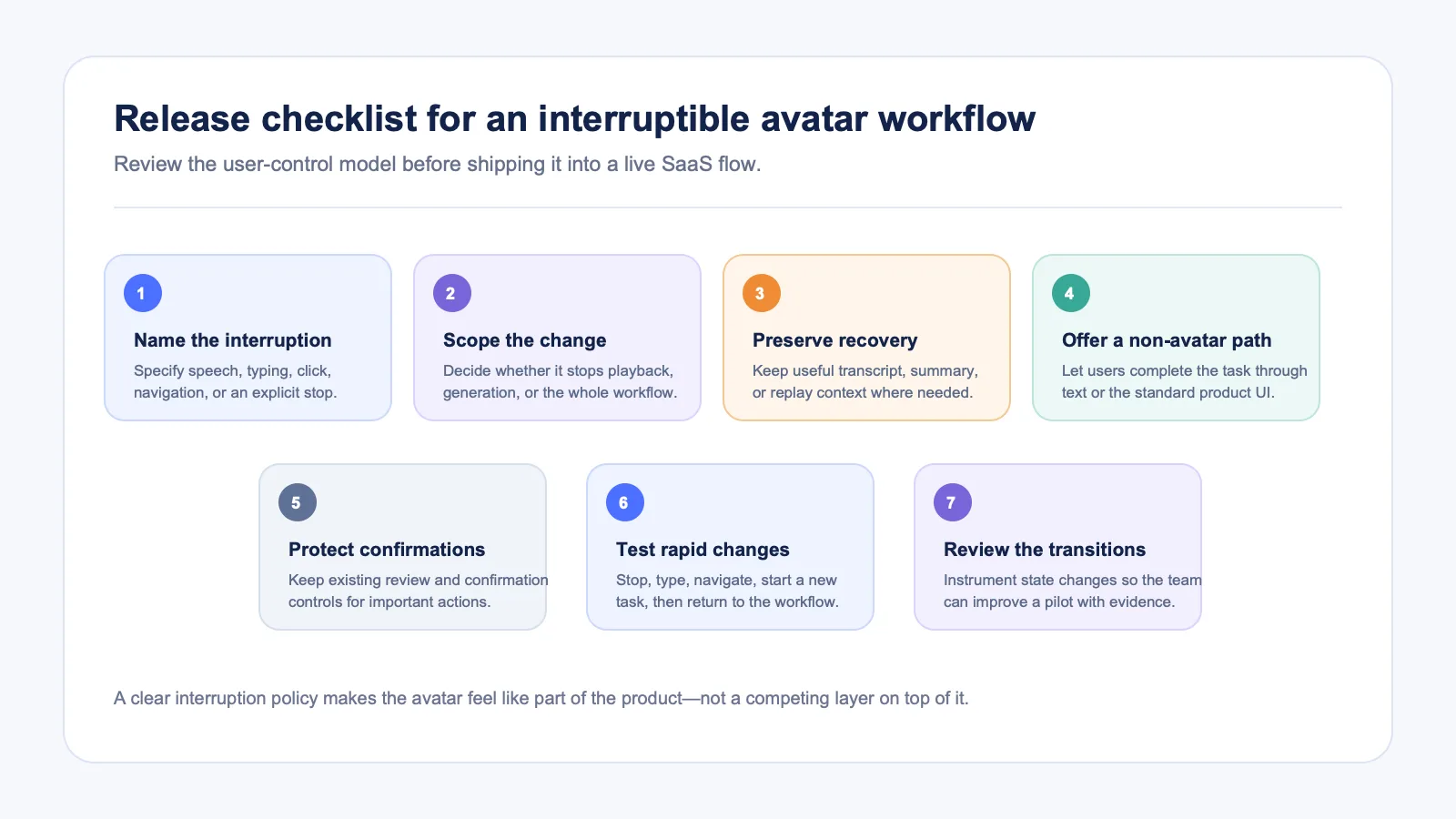
A practical release checklist
Before enabling an avatar in a production workflow, review these points with product, design, and engineering:
- Name the exact user actions that should stop or pause speech.
- Define whether each action stops playback only, cancels response generation, or starts a new workflow state.
- Preserve the transcript or summary whenever the user may need to recover context.
- Provide a typed or standard-UI path for completing the same task.
- Confirm that high-impact actions still use your product’s normal review and confirmation controls.
- Test rapid changes: stop, type, navigate, start a new task, and return later.
- Instrument the state transition in a way your team can review during a pilot.
Frequently asked questions
Can Spatius detect when a user wants to interrupt?
Your application or agent framework should determine user intent and own the turn-taking policy. Spatius converts avatar speech audio into real-time motion data, and AvatarKit renders the avatar locally. How you detect speech, clicks, typed input, or task changes belongs in your product architecture. See how Spatius defines those responsibilities.
Does interrupting the avatar mean deleting the response?
No. A useful interruption design distinguishes between stopping playback, pausing, starting a new response, and leaving the workflow. Keep a transcript or summary when users may need to recover what was said.
Can a new avatar response replace an existing one in Direct Mode?
The Direct Mode documentation says that sending new avatar speech audio starts a new round and interrupts ongoing playback. Your application still determines when a new user intent should cause that behavior. Read the Direct Mode conversation guidance.
What should happen if the motion connection is unavailable?
Design a product fallback that does not block the user. In Direct Mode, if the WebSocket connection fails within 15 seconds, the SDK enters an audio-only fallback while audio playback continues. Treat that as one technical fallback; your product should still make task status and non-avatar controls clear. See the Direct Mode fallback details.
Should the avatar interrupt a user?
Usually, no. An avatar can surface urgent, relevant information, but it should not compete with an active task. When information is truly important, use the product’s established notification, review, or confirmation pattern instead of relying on an avatar to seize attention.
Put the user—not the avatar—in charge
The goal is not to make the avatar speak continuously. It is to make a product interaction feel responsive when a visual presenter is useful and invisible when it is not.
If you are designing an AI avatar workflow for a SaaS product, request a Spatius demo to discuss the right integration path and presentation layer for your application.