

An AI avatar’s first appearance should make one thing easier for the user. It should not arrive as a generic host, read a long product tour, or ask the user to trust a new interface before it has shown a reason to exist.
For a B2B SaaS team, the first interaction is a product decision: what is the user trying to do at this moment, what can the avatar help explain or guide, and how can the user stay in control? A good answer is usually narrow. It might be explaining the next setup step, introducing a practice scenario, or walking a trial user through a feature that has just become relevant.
The avatar is the presentation layer around that experience. Your application still owns the conversation logic, user context, permissions, tools, and workflow decisions. Spatius converts the speech audio you choose to play into real-time motion data, while AvatarKit renders the avatar locally on the client. That system boundary is documented here.
Key takeaways
- Start with one product moment and one clear user job; do not use the avatar as a generic welcome screen.
- State the avatar’s role in plain language, including the action a user can take next.
- Put controls such as stop, mute, close, or switch-to-text where people can see them before they need them.
- Keep context, permissions, knowledge, and tool decisions in your application. The avatar should present the response your product has decided to make.
- Test whether users understand the role, find the controls, and move forward—not whether they simply watched the avatar.
Start with one bounded job
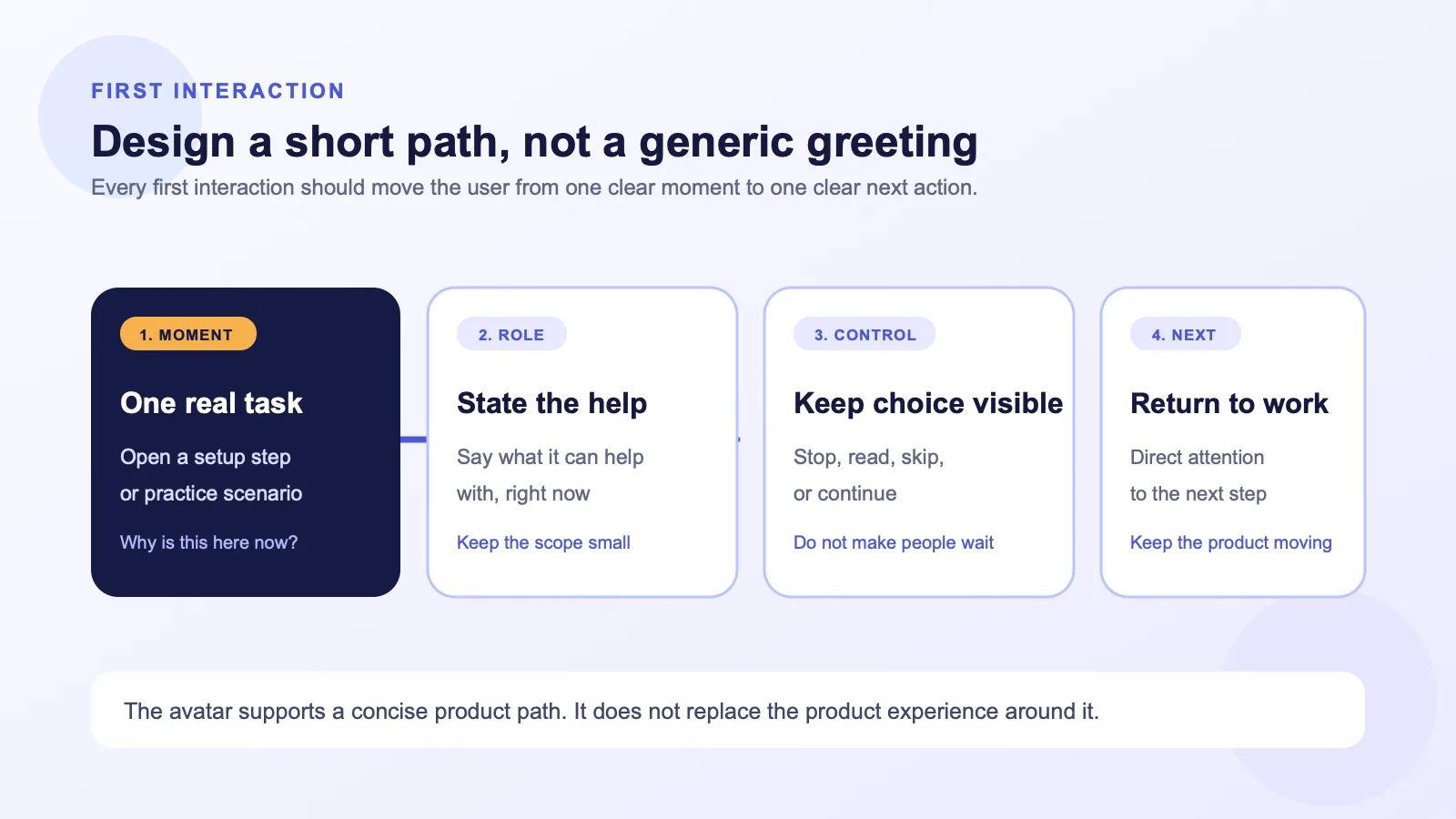
The first interaction should be tied to a moment already meaningful in the product. The user should be able to answer, “Why is this here now?” without reading a help article.
That makes the opening easier to write and easier to evaluate. Rather than placing an avatar on every screen, choose a situation where an explanation, guided choice, or practice step is genuinely useful.
| Product moment | Useful first job | What the opening should make clear | What happens next |
|---|---|---|---|
| A new workspace is being configured | Explain the one setup decision that blocks the next step | What the user is setting up and why it matters | Open or highlight the relevant setting |
| A trial user reaches a complex feature | Frame the feature around the user’s immediate task | What the feature can help them do right now | Let the user try the feature or view a short walkthrough |
| A team begins a sales or support practice | Establish the scenario and the role of the avatar | Who the user is practicing with and how to begin | Start the role-play or edit the scenario |
| A user encounters an unfamiliar workflow state | Explain what changed and which options are available | What the state means and whether action is required | Show the available choices in the product UI |
If the team cannot name a single next action, the first interaction is probably too broad. “Meet your AI assistant” may sound polished, but it does not help a user decide what to do.
A simple test
Before designing the screen, complete this sentence:
When [user type] reaches [product moment], the avatar helps them [complete or understand one specific thing], then sends them to [next action].
For example: “When a new admin opens the integration setup, the avatar helps them understand the required connection details, then sends them to the setup form.” The value is in the product step, not in the avatar introduction.
Make the avatar’s role legible in the first sentence
The first spoken line should establish three things quickly:
- Role: what this interface is for.
- Scope: what it can help with in the current moment.
- Choice: what the user can do next.
That is different from trying to introduce every capability at once. The purpose is not to prove the avatar is clever. It is to remove uncertainty.
| Avoid | Use instead |
|---|---|
| “Hi, I’m your intelligent AI assistant. How can I help today?” | “I can walk you through the two settings needed to connect this workspace. You can start here, or skip to the form.” |
| “Welcome to the future of work.” | “This is the review step before you publish. I can explain what each status means.” |
| “Ask me anything.” | “I can help you practice this customer conversation. Choose a scenario to begin, or edit the brief first.” |
The examples are product copy patterns, not scripted product promises. Only offer actions that the user can actually take in that product state. If the avatar cannot access a setting, cannot start a workflow, or cannot answer a category of question, do not imply that it can.
Put control before the user needs it
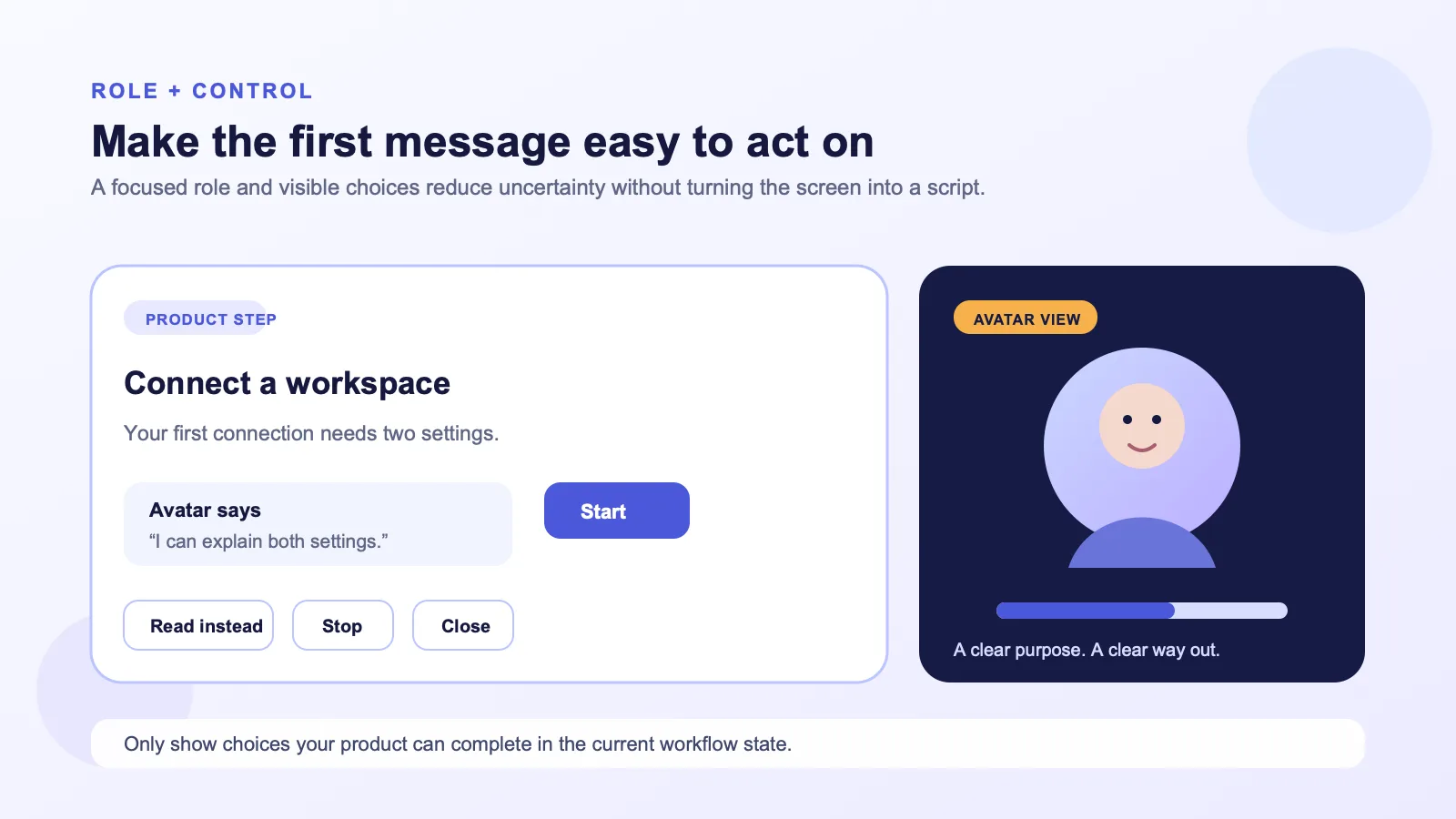
Audio and motion make an interaction feel more present. They can also make a user feel trapped if there is no clear way to move on.
Treat controls as part of the first message—not as an afterthought. Depending on the experience your team is building, that can include:
- Stop or skip: end the current explanation and continue in the product.
- Mute: keep the visual interface available without sound.
- Text alternative: read the same core guidance instead of listening.
- Close or minimize: return to the workflow without dismissing the product task itself.
- Choose a path: start, view examples, edit details, or come back later.
There is no universal control set to copy. The right controls depend on the workflow, the user’s environment, and the behavior your application supports. The principle is simpler: a user should never need to wait through an introduction to regain control of their work.
Design the exit before the entrance
In a first-session flow, define the ending before you polish the opening. Ask:
- What does the user see if they skip immediately?
- What information remains available if they mute the experience?
- Does closing the avatar preserve their progress?
- What happens if the user wants to use the product in text only?
- Which product control is visually primary after the introduction ends?
If those answers are unclear, the experience is not ready for a polished opening script.
Keep the intelligence in your product layer
An avatar should not become a shortcut around the product architecture. Your SaaS application decides the conversation context, retrieves the relevant knowledge, applies permissions, runs tools or workflows, and decides what response is appropriate. It then produces the avatar speech audio through the speech stack it operates.
Spatius is an avatar-only service: Motion Server receives avatar speech audio and returns motion data; AvatarKit renders the avatar on the client. Spatius does not return finished video, and the documentation places ASR, LLM, TTS, turn-taking, and interruption policy outside Spatius unless the integration platform provides them. See the developer docs map.
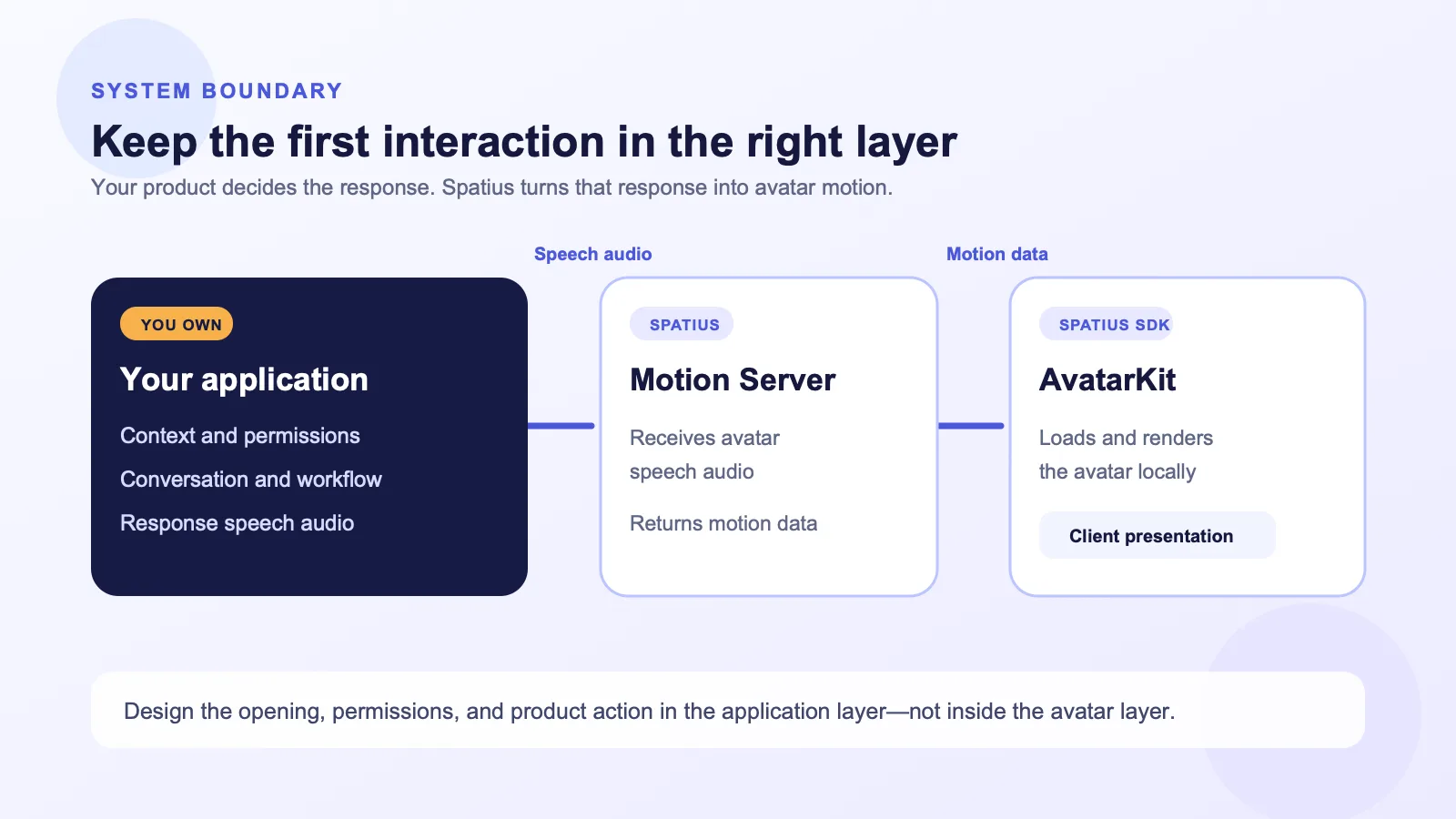
This boundary changes how the opening should be designed:
- Use only the context your application has decided is appropriate for that moment.
- Present a response after your product has made the relevant permission and workflow decisions.
- Keep action buttons in the product interface, where the user can understand what will happen.
- Do not describe the avatar as if it independently owns account access, policy decisions, or workflow execution.
If you already have avatar speech audio from your own TTS, a TTS provider, or prerecorded content, Direct Mode is one documented path for sending it from the client to Motion Server and rendering the returned motion locally. Review the Direct Mode overview before implementation.
Choose when the interaction appears
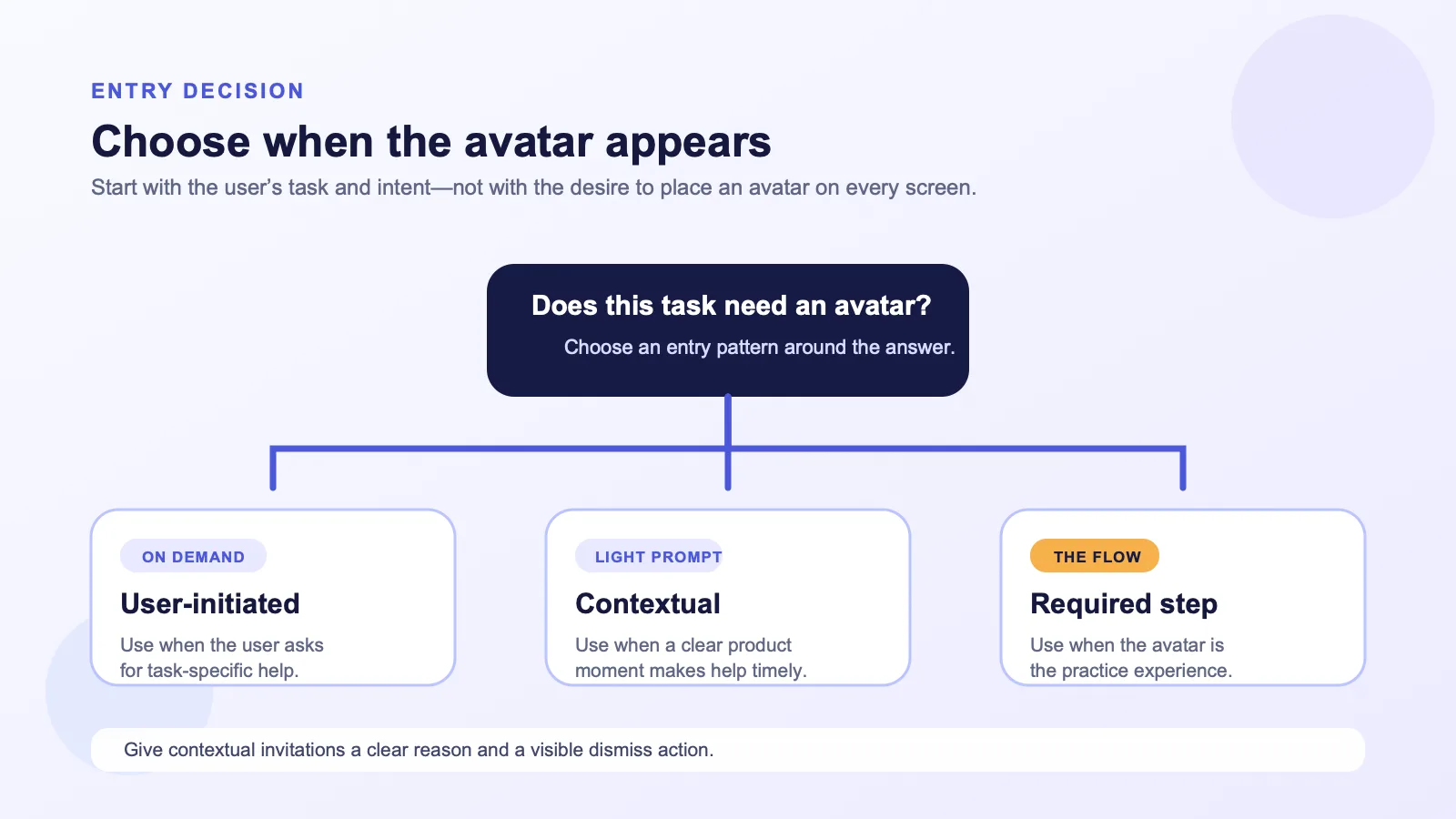
There are three common entry patterns. None is automatically right; choose based on the cost of interrupting work and the value of timely guidance.
| Entry pattern | Best when | Risk to manage | Useful design move |
|---|---|---|---|
| User-initiated | The user knows they need help or wants a walkthrough | The feature may be overlooked | Place a clear, task-specific entry point near the relevant task |
| Contextual invitation | The product can detect a meaningful moment, such as an incomplete setup | The invitation may feel intrusive | Explain why it appears and include a dismiss option |
| Required step in a practice flow | The avatar is the experience itself, such as a guided simulation | The user may not understand the rules | State the scenario, the goal, and how to pause or exit before starting |
For early pilots, user-initiated or lightly contextual entry points are usually easier to learn from. They make user intent visible in the data and reduce the chance that the experience interrupts a task it was meant to support.
Write the first interaction as a short product sequence
The opening does not have to be one long spoken message. In fact, it is often clearer as a compact sequence:
- Orient: name the current product moment.
- Set scope: say what the avatar can help with here.
- Offer a choice: give the user a small number of valid next actions.
- Hand back control: bring attention to the product action, not the avatar.
Here is a practical template:
You’re at [current step]. I can help you [specific help]. Choose [action A] to continue, or [action B] to review it on your own.
Keep the first message short enough that the user can act before they have forgotten where they were. Put longer explanations behind an intentional choice such as “Explain this,” “Show an example,” or “Practice now.”
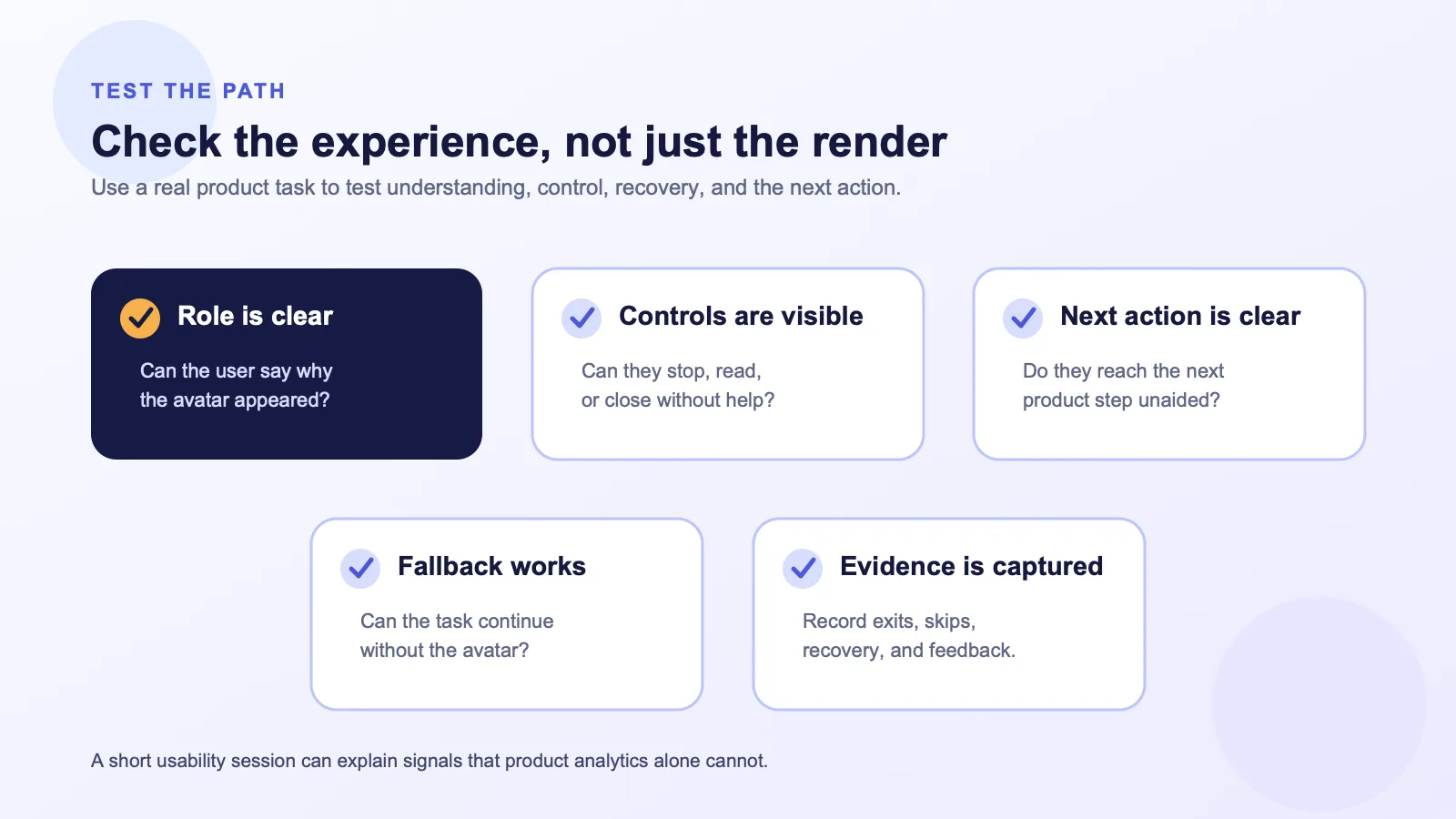
Test the first interaction as a product path
Do not measure success by whether the avatar rendered correctly or whether users listened to the whole first message. Those checks matter, but they do not tell you whether the interaction helped.
Run a small usability pass around one task. Watch whether a user can identify the avatar’s role, find an exit, and continue the product flow without prompting. Then review the paths users took—not just the paths the team expected.
| Test question | What to observe |
|---|---|
| Do users understand why the avatar appeared? | Can they describe the current task and the avatar’s role in their own words? |
| Can users control the experience? | Can they find stop, mute, close, or text options without coaching? |
| Does the avatar move the task forward? | Do users reach the intended next product action, or become stuck in the introduction? |
| Does the fallback still work? | If the avatar is skipped or unavailable, can the user still complete the core task? |
| Is the product boundary clear? | Do users mistake the avatar for an autonomous owner of account access or workflow decisions? |
Common mistakes to avoid
Treating the avatar as the product tour
A complete product tour is rarely the best first use of a conversational interface. Put the avatar beside a specific decision or task instead, and let the product UI carry the information it already communicates well.
Giving the avatar a vague mandate
“Ask me anything” creates expectations your current product experience may not meet. State the scope for the current screen, and provide a clear route to broader help if your product offers it.
Hiding the controls
If skipping, muting, or closing is visually secondary, the user may feel that the experience is being imposed on them. The ability to leave is part of the product’s trust model.
Collapsing product logic into the avatar layer
Keep permissions, context selection, tools, and workflow actions in your application. The avatar can present a product response; it should not obscure where decisions and actions actually happen.
Expanding before you have learned from one flow
One well-instrumented task teaches more than a broad rollout with unclear goals. Start with a high-intent moment, establish a baseline, and revise the experience before adding more placements.
A compact first-interaction brief for product teams
Use this before design and engineering begin:
| Decision | Write down |
|---|---|
| User and moment | Who sees the avatar, and at which exact product step? |
| User job | What should the user understand, decide, or do next? |
| Avatar scope | What can it help with in this interaction—and what is out of scope? |
| Context and permissions | Which application-owned data and rules shape the response? |
| Controls | How can the user stop, mute, close, or switch to text? |
| Fallback | What remains usable if the avatar is skipped or unavailable? |
| Measurement | Which next action and recovery signals will show whether it helped? |
The deliverable is not just a script. It is a small, controlled product path that happens to be presented through an avatar.
FAQ
Does Spatius decide what the avatar says?
No. Spatius converts avatar speech audio into real-time motion data and AvatarKit renders the avatar locally. Your application, agent framework, or backend owns the conversation logic, including ASR, LLM, TTS, turn-taking, and interruption policy. See the documented product boundary.
Can we use an existing TTS system for the first interaction?
Yes, if your application already produces avatar speech audio, Direct Mode is documented for that situation. In that path, the client sends the audio to Motion Server, receives motion data, and renders locally with AvatarKit. Review the current integration requirements before selecting an implementation path. Direct Mode overview.
Does Spatius return a finished avatar video?
No. The documented output is real-time motion data for AvatarKit to render locally; Spatius does not return finished video. Developer docs map.
Should every new user see the avatar?
Not necessarily. Use it where the interaction helps with a real product task. A user-initiated entry point or a narrowly contextual invitation can be a more useful first test than a universal welcome.
What should we measure first?
Measure the product path: entry, control use, the intended next action, skips, exits, and recovery paths. Pair those signals with short usability sessions so you can understand why users chose a path.
Build a first interaction around a real product moment
If you are planning an interactive avatar layer for a B2B SaaS workflow, start with one bounded experience and make the ownership boundaries clear from the beginning. Request a Spatius demo to discuss the integration path that fits your product architecture.